
For restaurants, cafés and dhabas
Restaurant Billing Software with Tables and KOT
At a restaurant the bill comes last. First a table fills up, the order is taken, the kitchen gets a ticket, a second round of rotis is ordered, and only then does the table ask for the bill.
- A table chart: free or taken, running total, since when
- Numbered KOTs on an 80 mm slip for the kitchen
- One GST bill per table, dishes added up across KOTs
- Takeaway and parcel orders, settled in cash, UPI or card
What is Restaurant Billing Software?
VyapRise is restaurant billing software that keeps a chart of your tables, takes each table's order with notes for the kitchen, prints a numbered KOT (kitchen order ticket) for every round, and turns the whole order into one GST bill when the table is done.
Takeaway and parcel orders get their own numbers on the same screen, and the bill is settled in cash, UPI or card in one step, or split between guests. Choose Restaurant & café when you sign up and Tables & KOT and the POS are switched on. Both are part of Pro, free for your first 7 days; GST invoices work on every plan.
What a restaurant needs from billing software
Which tables are busy, what the kitchen has to cook, and a correct bill when the table gets up. These are the parts VyapRise covers.
Tables and a table chart
Set up your tables with an area such as Ground floor or Terrace and the number of seats. The table chart shows each table free or taken, its running total, since when it has been taken, and how many dishes have not yet gone to the kitchen. Tables & KOT is part of Pro.
An order on each table
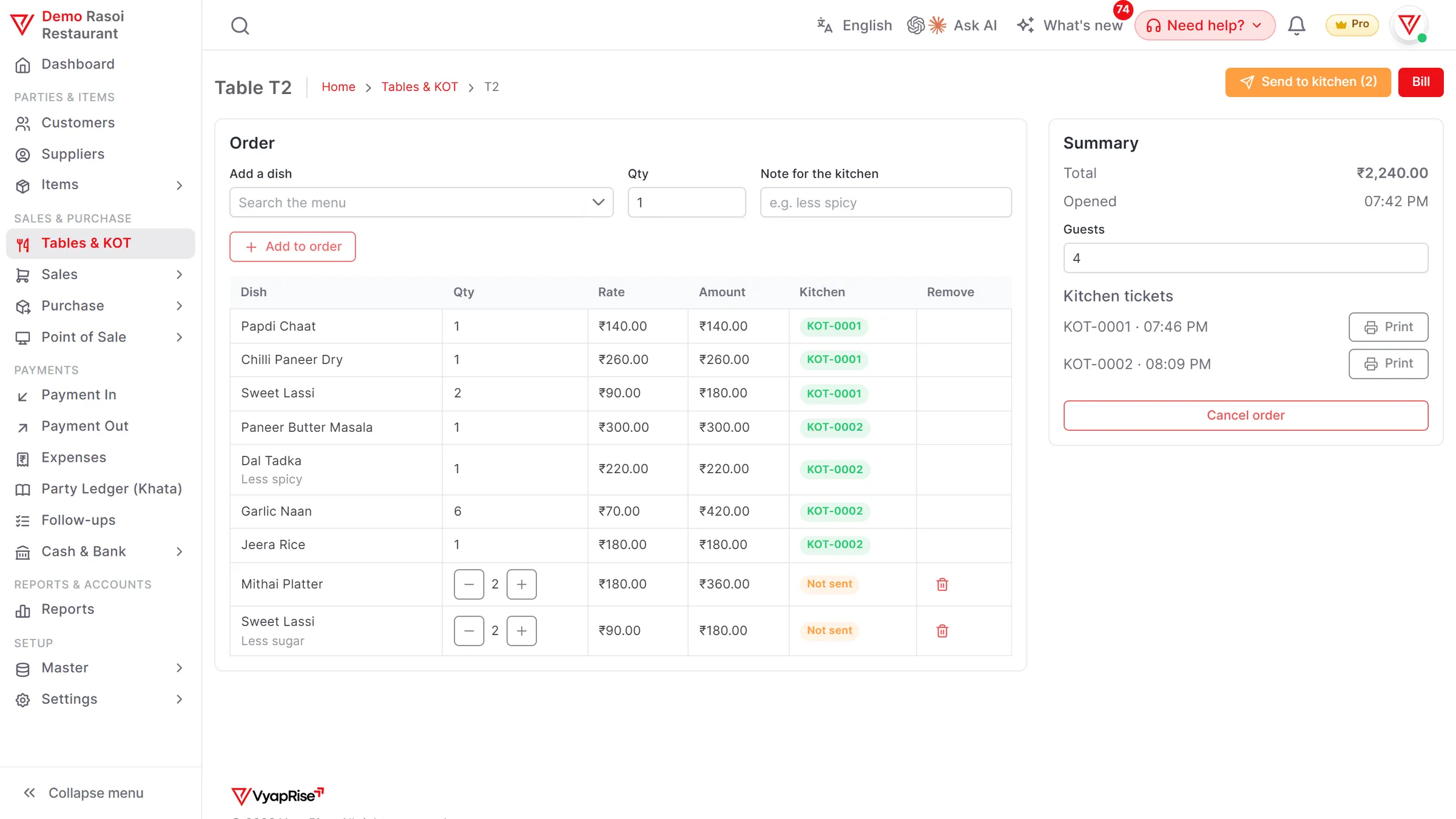
Tap a table to open its order and tap dishes on the menu, shown as tiles by category with a search. Add a note for the kitchen, such as less spicy or no onion. The order stays on the table until it is billed or cancelled, and the guests can move to another free table, or join a table that is already taken: its order takes the dishes and KOTs, the guests add up, and one bill covers both tables. Pro.
Send to kitchen: a numbered KOT
Press Send to kitchen and the new dishes go on a numbered KOT (KOT-0001, KOT-0002 and so on). Dishes already sent stay on their own KOT, so the kitchen only sees what is new. Pro.
An 80 mm KOT slip
Each KOT opens as an 80 mm slip with the table, KOT number, time, dishes, quantities and notes, and no prices, printed from the browser on the printer your computer or phone already uses. Pro.
Cancel a dish the kitchen has
A dish that has gone to the kitchen is not changed on its KOT. To call it off, cancel it with a reason: a cancellation KOT tells the kitchen to stop, and the dish comes off the bill. An extra portion goes on the next KOT as a new line, so the kitchen's slips and the bill always agree. Pro.
Print the bill and settle it
Print the bill on an 80 mm slip, with a discount if you give one. Press Settle, take the money in cash, UPI or card, or split it across them, and the GST invoice is saved with the whole order, the same dish across several KOTs on one line. The table is free again. Pro. The full invoice form (Free) is there too when a customer needs their GSTIN on the bill.
Kitchen display screen
Open the Kitchen Display on a screen in the kitchen: the KOTs still to cook or serve, oldest first, with the minutes since each was sent, the dish notes and cancelled dishes struck through. The kitchen marks each Ready, then Served. It refreshes every 15 seconds. Pro.
Split the bill between guests
Pick what one guest pays for, a whole dish or part of one, see their share and take their payment in cash, UPI or card. The rest stays on the table for the next guest. Pro.
Recipe stock
Set a dish up as a kit of its ingredients, such as 0.2 kg paneer a plate, and billing the dish uses the ingredients up from stock. Kits are part of Pro.
Swiggy and Zomato orders
Choose Swiggy / Zomato order at Tables & KOT, pick the app and type its order number; you enter the order yourself, as there is no automatic link. The bill carries no GST, because the app charges and pays it, and it stays owed by the app until its payout. When the payout comes, type in the app's statement: VyapRise matches it against your orders for those dates, shows missing orders and value differences, and books the money received, the TDS and the app's charges. Pro.
Takeaway and parcels
Press New takeaway and the order gets its own number (TA-0001), goes to the kitchen on a KOT marked takeaway, and is settled like a table. A shop counter can also sell through the POS with 80 or 58 mm receipts. Both are part of Pro.
See the POSGST bills for every table
Each dish keeps its own SAC or HSN and GST rate, and a menu price that already includes GST can be marked so, with the tax worked back on the bill. The invoice carries your logo and a UPI QR code. Free, 10 invoices a month.
GST billing
An evening at a restaurant using VyapRise
Simple numbers, real steps, so you can see whether it fits your floor and your kitchen.
Once: setting up. You add twelve tables: T1 to T8 on the ground floor with four seats each, and T9 to T12 on the terrace. Your dishes are items with their rates, such as paneer tikka at ₹280, dal makhani at ₹240, butter roti at ₹40 and masala chaas at ₹60.
8:05 pm: a family sits at T10. You tap T10 on the table chart and add one paneer tikka with the note less spicy, one dal makhani, four butter rotis and two masala chaas. You press Send to kitchen: KOT-0041 opens as an 80 mm slip with T10, the time and the four dishes, and you print it for the kitchen.
8:30 pm: a second round. The table asks for two more butter rotis. You add them to T10 and send them: KOT-0044 carries only the two rotis. On the table chart T10 shows taken since 8:05 and its running total.
8:40 pm: a parcel order. A customer at the counter wants a dal makhani to take away. You press New takeaway, tap the dish, send it to the kitchen and settle it by UPI.
8:50 pm: a Zomato order. A new order for a paneer tikka comes in on the Zomato app. You press Swiggy / Zomato order, pick Zomato, type its order number and send the dish to the kitchen. The bill goes to Zomato without GST and stays owed until Zomato's payout.
9:15 pm: the bill. T10 asks for the bill. You print it: paneer tikka, dal makhani, six butter rotis (the four and the two added up into one line) and two masala chaas, ₹880, plus 5% GST of ₹44, ₹924 in all. They pay ₹500 in cash and the rest by UPI; you press Settle, enter the two amounts, and the invoice is saved and T10 shows free on the chart.
Next morning. The sales report shows yesterday's bills, table and counter together.
- Most standalone restaurants charge 5% GST without input tax credit. Your rate depends on how your restaurant is set up; confirm it with your CA.
- If your menu prices include GST, mark each dish's rate as GST-inclusive and the tax is worked back on the bill. This works on every plan.
- On Swiggy and Zomato orders the app pays the GST under section 9(5) of the CGST Act. VyapRise keeps these orders out of your own taxable sales and shows them in GSTR-1 table 14(b) under the app's GSTIN and in GSTR-3B 3.1.1(ii). Table 14(b) is on screen and in the CSV, not in the GSTR-1 JSON file, so enter it on the portal.
- On Free you keep up to 30 items, dishes included. Tables & KOT and the POS need Pro after the trial.
Restaurant tasks and how VyapRise handles them
Free is free forever; Pro is ₹1,499 per year.
| Task | How VyapRise handles it | Plan |
|---|---|---|
| Tables | Each table with an area (Ground floor, Terrace) and seats | Pro |
| Table chart | Free or taken, running total, since when, dishes not yet sent | Pro |
| Take the order | Dishes from your item list with a quantity and a kitchen note | Pro |
| KOT | Send to kitchen: numbered KOT-0001, 80 mm slip with table, time, dishes, quantities and notes, no prices | Pro |
| Cancel a sent dish | Cancellation KOT with the reason; the dish comes off the bill | Pro |
| Move a table | The order, KOTs and bill move to a free table | Pro |
| Join two tables | Seat guests at a taken table: its order takes the dishes and KOTs, one bill for both | Pro |
| Kitchen display | KOTs to cook or serve, oldest first, minutes since sent, notes; Ready / Served; refreshes every 15 seconds | Pro |
| Split bill | One guest's dishes or part of a dish, their share, cash / UPI / card; the rest stays on the table | Pro |
| Recipe stock | Dish set up as a kit of ingredients; billing it uses them up from stock | Pro (kits) |
| Bill and settle | 80 mm bill with a discount; Settle takes cash, UPI and card, saves the GST invoice and frees the table | Pro |
| Takeaway and parcels | Numbered takeaway orders (TA-0001) on the same screen; or the counter POS with 80 / 58 mm receipts | Pro |
| Swiggy / Zomato orders | Entered by hand with the app and its order number; no GST on the bill (the app pays it); owed by the app until its payout; GSTR-1 table 14(b) and GSTR-3B 3.1.1(ii) | Pro |
| App payouts | Type in the payout statement; matched against the orders for those dates; receipt with TDS (194-O) and the app's charges as an expense | Pro |
| Menu prices with GST | Rate marked GST-inclusive, tax worked back on the bill | Free |
| GST invoice | SAC or HSN and GST on each line, UPI QR, 4 print layouts | Free, 10 a month |
There is no automatic Swiggy or Zomato link: you type each app order in, and menus are not synced. Table 14(b) is not in the GSTR-1 JSON file. On Free you make 10 sales invoices a month as the owner alone.
Is VyapRise the right restaurant billing software for you?
Before you set it up, the gaps.
A good fit if you
- Run a restaurant, café or dhaba with tables and a kitchen that works from printed KOTs
- Want to see at a glance which tables are taken and what each one has ordered
- Want one correct GST bill per table, however many rounds were ordered
- Sell takeaway and parcels at a counter, see the POS
- Take Swiggy or Zomato orders and want them out of your own GST and checked against each payout
- Want GST bills, sales reports and the books in one place, see accounting
Not a fit yet if you
Need Swiggy or Zomato orders coming in by themselves, or menus kept in step with the apps: VyapRise has no link to the delivery apps, so each app order is typed in. There is no captain or waiter app. KOTs print through the browser; there is no direct thermal-printer driver. It runs in the browser and needs internet; there is no offline mode.
Common questions
Can VyapRise print a KOT for the kitchen?
Yes, on Pro. Press Send to kitchen on a table's order and the new dishes go on a numbered KOT. It opens as an 80 mm slip with the table, KOT number, time, dishes, quantities and notes, without prices, and you print it from the browser on the printer your device already uses. There is no direct thermal-printer driver.
What if a guest changes a dish after it has gone to the kitchen?
Cancel the dish and give the reason: a cancellation KOT tells the kitchen to stop, and the dish comes off the bill. An extra portion is a new line that goes on the next KOT. The bill adds up the same dish across KOTs into one line.
How is the table's bill made?
Print the bill from the table, with a discount if you give one. When they pay, press Settle and enter what came in cash, UPI or card: the GST sales invoice is saved with the whole order and the table is free again. If you delete that invoice, the order comes back on the table. Tables & KOT is part of Pro; the invoice itself is the same GST invoice used on every plan.
Does it take Swiggy or Zomato orders?
Yes, typed in by hand, on Pro. There is no automatic link: orders are not pulled in from the apps and menus are not synced. At Tables & KOT, choose Swiggy / Zomato order, pick the app and type its order number. The bill has no GST, because the app charges and pays the GST under section 9(5) of the CGST Act; it goes to the app and stays owed until the app's payout. These orders are kept out of your B2CS, B2B and HSN figures and shown in GSTR-1 table 14(b) under the app's GSTIN, on screen and in the CSV but not in the GSTR-1 JSON file, so enter 14(b) on the portal; and in GSTR-3B 3.1.1(ii). There is no waiter app.
How do I check a Swiggy or Zomato payout?
Type in the app's payout statement: the orders, order value, commission, GST on commission, TDS under section 194-O, other charges and the amount paid. VyapRise matches it against the orders you recorded for those dates and shows missing orders and value differences. Then it books a receipt from the app, with the TDS, and an expense for the app's charges. If you are eligible, the GST on the commission can be claimed as input tax credit; that is optional. Pro.
What GST rate should a restaurant charge?
Most standalone restaurants charge 5% GST without input tax credit, and VyapRise lets you set the rate on each dish. Restaurants in some hotels and outdoor catering can fall under other rules, so confirm your rate with your CA.
How much does restaurant billing software cost on VyapRise?
Tables & KOT and the POS are part of Pro, at ₹1,499 per year, with no limit on bills and no per-user charge for your staff. New companies get 7 days of Pro free. The Free plan keeps 10 GST invoices a month and 30 items for the owner alone, without tables, KOTs or the POS.
Related pages
- POS billing softwareCounter billing with split payments and shifts.
- Bakery and sweet shop billing softwareWeighing-scale labels, cake orders and expiry dates.
- GST billing softwareGST invoices with HSN or SAC, UPI QR and print layouts.
- Inventory management softwareStock, low-stock alerts and stock reports.
- GST rates 2026The GST slabs after the September 2025 changes.
Run your restaurant floor on VyapRise
Choose Restaurant & café, add your tables and dishes, and send your first KOT to the kitchen. Try Pro free for 7 days; no card needed.