
For salons, spas and beauty parlours
Salon Billing Software with Appointments and GST Bills
A salon's day is a list of names and times: a haircut at ten, a facial at eleven, a bridal booking in the afternoon and walk-ins in between.
- A day view of appointments with status tabs
- Customer or walk-in, services, staff and length
- Arrived, Done and Bill from the list
- Products in stock, billed with the services
What is Salon Billing Software?
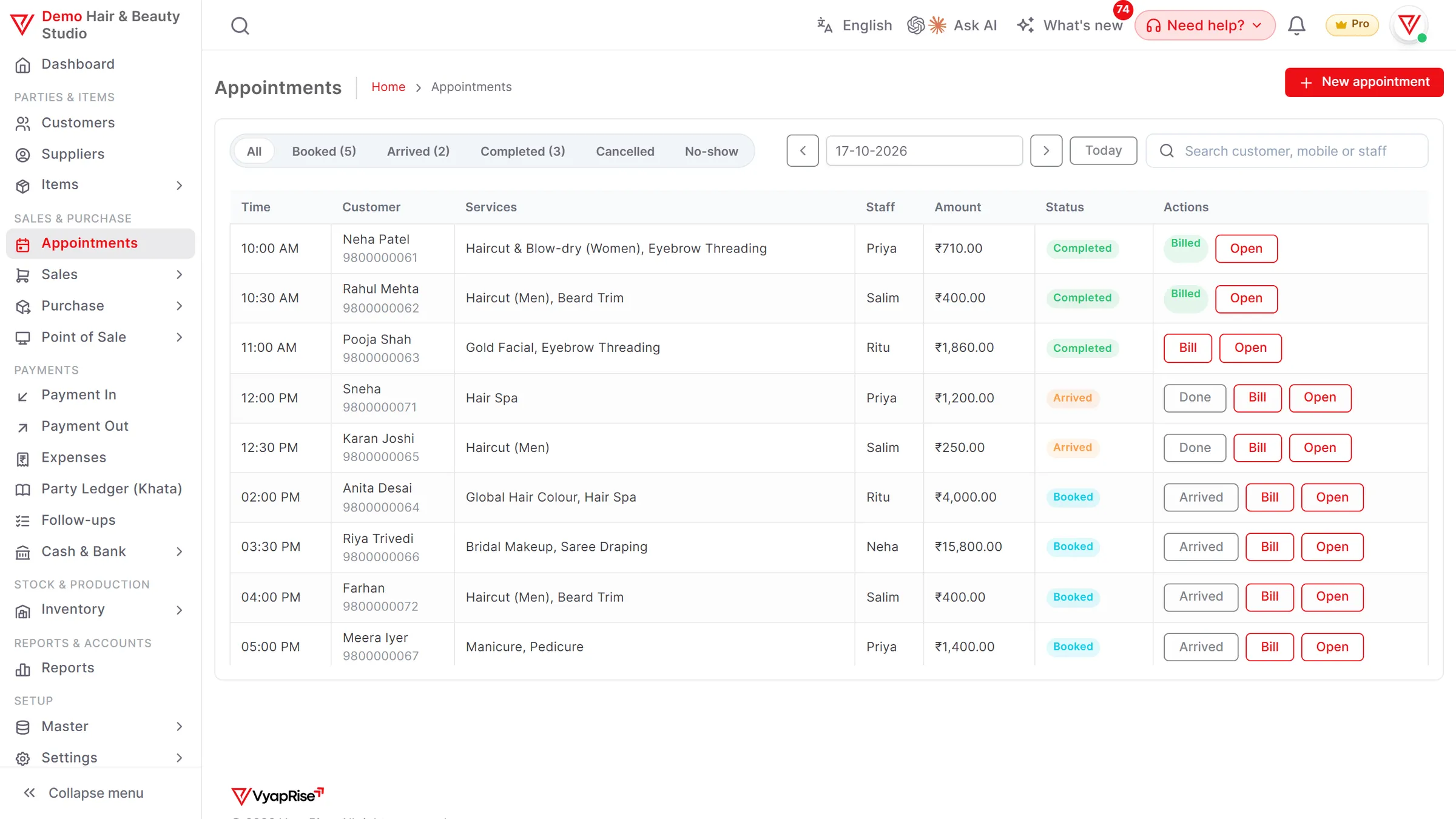
VyapRise is salon billing software that keeps the day's appointments in one view, or in a column per staff member, with who is booked, who has arrived and who is done, the services and the staff member for each, and turns a finished appointment into a GST bill with one press.
Customers can also book a free time themselves from your own booking link. Shampoos, creams and other products you sell are kept in stock and billed on the same invoice or at the counter POS. Choose Salon & spa when you sign up and Appointments, the POS and inventory are switched on. Appointments and the POS are part of Pro, free for your first 7 days; GST invoices work on every plan.
What a salon or spa needs from billing software
Who is coming when, what they are having done, who is doing it, and a correct bill at the end. These are the parts VyapRise covers.
The day's appointments
Appointments shows one day at a time, with previous, next and today buttons to move between days. Status tabs for booked, arrived, completed, cancelled and no-show show how many are in each, and search finds an appointment by customer, mobile or staff name. The by-staff view puts each stylist's day in their own column. Appointments is part of Pro.
Book an appointment
Pick the customer, or type a walk-in's name and mobile. Set the date, time and length, from 15 minutes to 3 hours, type who will serve, and add the services from your item list with quantity and rate, with notes if needed. If that staff member is already booked at an overlapping time, you are warned first and can still save. Pro.
Online booking link
Your salon gets its own booking page, with no app to install. The customer picks the services, a staff member or Anyone available, a day and a free time. Free times come from your opening hours, holidays, slot length and minimum notice and from the appointments already booked, so nobody is booked twice. The booking lands in Appointments marked Online, and you can get an email for each one. You share the link yourself: copy it, or send it on WhatsApp with the text filled in. Pro; on Free the page says it is not taking bookings.
Arrived and Done
Mark a customer Arrived when they walk in and Done when the service is finished, straight from the list. Cancelled and no-show appointments get their own tabs, so you can see who did not turn up. Pro.
Reminder emails the evening before
Turn on appointment reminders and each customer with an email gets one the evening before, at 6 pm, with a link to stop them. They are off until you turn them on. On WhatsApp, press Remind and send the message yourself. Pro.
Bill the appointment
Press Bill and a GST invoice opens with the appointment's services. Add a product the customer buys, save, and the appointment is locked as billed, so it cannot be billed twice. Appointments is Pro; the GST invoice itself is Free, 10 invoices a month.
Services with their own rates
Keep each service, such as a haircut, hair spa, facial or manicure, as a service item with its SAC, rate and GST rate. Services hold no stock. Free, up to 30 items on the Free plan.
Products in stock
Shampoos, serums and creams you sell are goods with their own stock, reduced by every sale, with low-stock alerts in the app. Stock in one warehouse works on Free; buying stock in on purchase bills is part of Pro.
InventoryOffers for quiet days
Set up an offer such as 20% off hair services on Tuesdays, or ₹ off the whole bill between set dates and hours, and it applies by itself on the invoice. Offers work on the invoice on every plan; at the POS they need Pro.
The counter and loyalty points
Sell products at the counter POS with cash, UPI and card on one bill, and turn on loyalty points so named customers earn on their bills and redeem them later. The POS and loyalty points are part of Pro.
See the POS
A Saturday at a salon using VyapRise
Simple numbers, real steps, so you can see whether it fits your salon.
Friday evening: a booking by phone. A regular customer calls for Saturday at 10 am. You open Saturday in Appointments and book her: a haircut at ₹400 and a hair spa at ₹1,200, 1 hour 30 minutes, with Meena to serve, and the note no hair dryer.
Saturday, 9:55 am: she arrives. You mark her Arrived. The booked tab shows how many are still to come, and the arrived tab shows who is in the chair.
11:30 am: a walk-in. A man walks in for a beard trim. You type his name and mobile as a walk-in, add the beard trim at ₹150 and a 15 minute slot with Ravi.
11:40 am: the first bill. Her services are done; you mark her Done and press Bill. The invoice opens with the haircut and the hair spa. She also buys a bottle of shampoo at ₹450, which you add before saving. She pays by UPI, and the appointment is locked as billed.
3 pm: a no-show. The 2:30 pm facial does not turn up and does not answer the phone. You mark it no-show; it moves to the no-show tab and stays on record.
Evening. The completed tab shows every service done today, and the sales report shows the day's bills.
Saturday night: a booking from the link. A new customer opens the booking link you shared on WhatsApp, picks a facial with Meena on Sunday at 11 am and sees a confirmation on screen. It shows up in Appointments marked Online, and with booking emails on you get an email about it.
- The GST rate on salon and spa services depends on the service and on how you are registered. Set each service's SAC and rate, and confirm them with your CA.
- Online bookings only take free times. When you book at the desk and the same staff member is already booked at an overlapping time, VyapRise warns you first; you can still save. Reminder emails go only once you turn them on; on WhatsApp, press Remind on a booked appointment that has a mobile number: WhatsApp opens with the reminder filled in, and you press send.
- On Free you can keep up to 10 customers in all; Pro has no customer limit.
Salon tasks and how VyapRise handles them
Free is free forever; Pro is ₹1,499 per year.
| Task | How VyapRise handles it | Plan |
|---|---|---|
| Day view | Previous / next / today; tabs for booked, arrived, completed, cancelled and no-show with counts; search by customer, mobile or staff; one column per staff member | Pro |
| Reminders | Email the evening before at 6 pm once turned on, with a stop link; WhatsApp by pressing Remind | Pro |
| Book | Customer or walk-in name and mobile, date, time, length 15 min to 3 hours, staff (typed), services with quantity and rate, notes; a warning if that staff member is already booked then | Pro |
| Online booking | Your own booking link: the customer picks services, a staff member or Anyone available, a day and a free time; marked Online in Appointments; an email to you for each booking if you want one | Pro |
| Arrived and Done | Marked from the list | Pro |
| Bill | GST invoice with the services; a billed appointment is locked | Pro |
| Services | Service items with SAC, rate and GST, no stock | Free (30 items) |
| Products | Goods with stock in one warehouse, reduced by every sale | Free |
| Offers | % or ₹ off services, products or the whole bill, with dates, weekdays and hours | Free on invoices; POS Pro |
| Counter and loyalty | POS with cash, UPI and card on one bill; loyalty points on named customers | Pro |
| GST invoice | SAC or HSN and GST on each line, UPI QR, 4 print layouts | Free, 10 a month |
A WhatsApp reminder goes only when you press Remind and then send it; reminder emails go only once you turn them on, and there is no SMS. Online bookings take no payment or deposit, and customers cannot cancel or move them themselves. There is no staff commission worked out from appointments and no memberships or packages.
Is VyapRise the right salon software for you?
Before you set it up, the gaps.
A good fit if you
- Run a salon, spa or beauty parlour that books appointments by phone or at the desk
- Want the day's bookings, arrivals and no-shows on one screen
- Want customers to book a free time themselves from a link you share
- Want each finished appointment to become a GST bill without typing the services again
- Sell hair and skin products and want their stock kept, see inventory
- Want a fast counter for product sales, see the POS
Not a fit yet if you
Need customers to pay or leave a deposit when they book online, to cancel or move their own booking, a Book button on Google or Instagram, or SMS or WhatsApp messages sent automatically: VyapRise has none of these (you share the booking link yourself; Remind only opens WhatsApp with the message filled in; reminder emails go the evening before once you turn them on). The staff member is a typed name, so there is no commission worked out from appointments, and there are no memberships, packages or prepaid service cards. It runs in the browser and needs internet; there is no offline mode and no Play Store app.
Common questions
Can I book salon appointments in VyapRise?
Yes, on Pro. Appointments has a day view with previous, next and today, status tabs for booked, arrived, completed, cancelled and no-show, and search by customer, mobile or staff. Each appointment has the customer or a walk-in's name and mobile, the date, time and length, who serves, the services and notes.
How does an appointment become a bill?
Press Bill on the appointment and a GST invoice opens with its services. You can add products before saving. Once saved, the appointment is locked as billed, so it cannot be billed twice.
Does it send appointment reminders to customers?
By email, yes, once you turn reminders on: each customer with an email gets one the evening before at 6 pm, with a link to stop them. On WhatsApp, not by itself: a booked appointment with a mobile number has a Remind button that opens WhatsApp with the reminder filled in (name, date, time, your business name), and you press send. There is no SMS. Both are part of Pro.
Can customers book online?
Yes, on Pro. Your salon gets its own booking link, a web page with no app to install. The customer picks the services, a staff member or Anyone available, a day and a free time, and sees a confirmation on screen. Free times follow your opening hours, holidays, slot length, minimum notice and the appointments already booked, so a staff member is not booked twice; with no staff listed, up to the number you set can book the same time. The booking lands in Appointments marked Online, with an email to you if you want one. You share the link yourself, by copying it or on WhatsApp. There is no online payment or deposit, and the customer cannot cancel or move the booking themselves. On Free the page says it is not taking bookings.
Can I track each stylist's commission?
Not from appointments. The staff member on an appointment is a typed name; the by-staff view shows each one's day and you are warned before booking someone twice at the same time, but there is no commission worked out from the services they did.
Can I sell memberships or service packages?
No, there are no memberships, packages or prepaid service cards. You can run offers such as a weekday discount on the invoice (every plan), and loyalty points on named customers at the POS (Pro).
How much does salon billing software cost on VyapRise?
Appointments and the POS are part of Pro, at ₹1,499 per year, with no limit on bills and no per-user charge for your staff. New companies get 7 days of Pro free. The Free plan keeps 10 GST invoices a month, 30 items and 10 customers for the owner alone, without appointments.
Related pages
- POS billing softwareCounter billing with split payments and loyalty points.
- Cosmetics shop billing softwareBeauty products with shades, expiry and MRP.
- GST billing softwareGST invoices with SAC, UPI QR and print layouts.
- Inventory management softwareStock, low-stock alerts and stock reports.
- Customer ledgerCustomer balances, statements and dues.
Run your salon's day on VyapRise
Choose Salon & spa, add your services and book tomorrow's first appointment. Try Pro free for 7 days; no card needed.