
For kirana and grocery shops
Kirana Store Billing Software for a Busy Counter
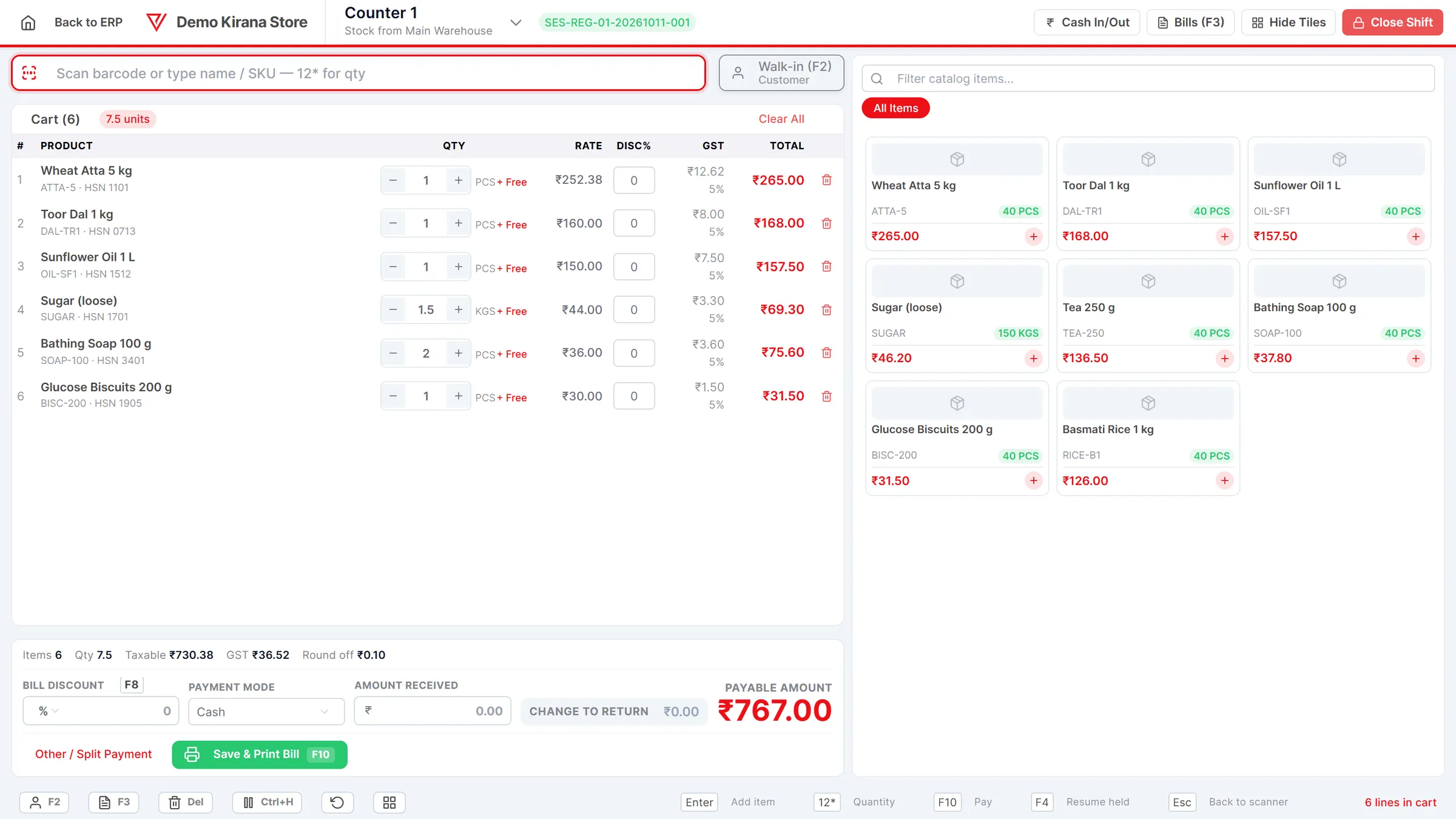
Scan the packet, type the weight of the loose dal, let the customer scan the UPI QR on the till for part and pay the rest in cash, put a regular's purchase on khata.
- Barcode scanner billing with GST or bill of supply
- Split UPI and cash, khata for regulars
- Offers, loyalty points and low-stock alerts
- No per-counter or per-user fee
What is Kirana Store Billing Software?
VyapRise is kirana store billing software that runs in the browser on your counter PC or tablet, keeps your stock moving with every bill, and tells you what is running low before the shelf is empty.
Run a Sunday offer that applies on its own, give regulars loyalty points, and take a return or exchange at the counter without a notebook. Counter billing (POS) is part of Pro; try it free for 7 days.
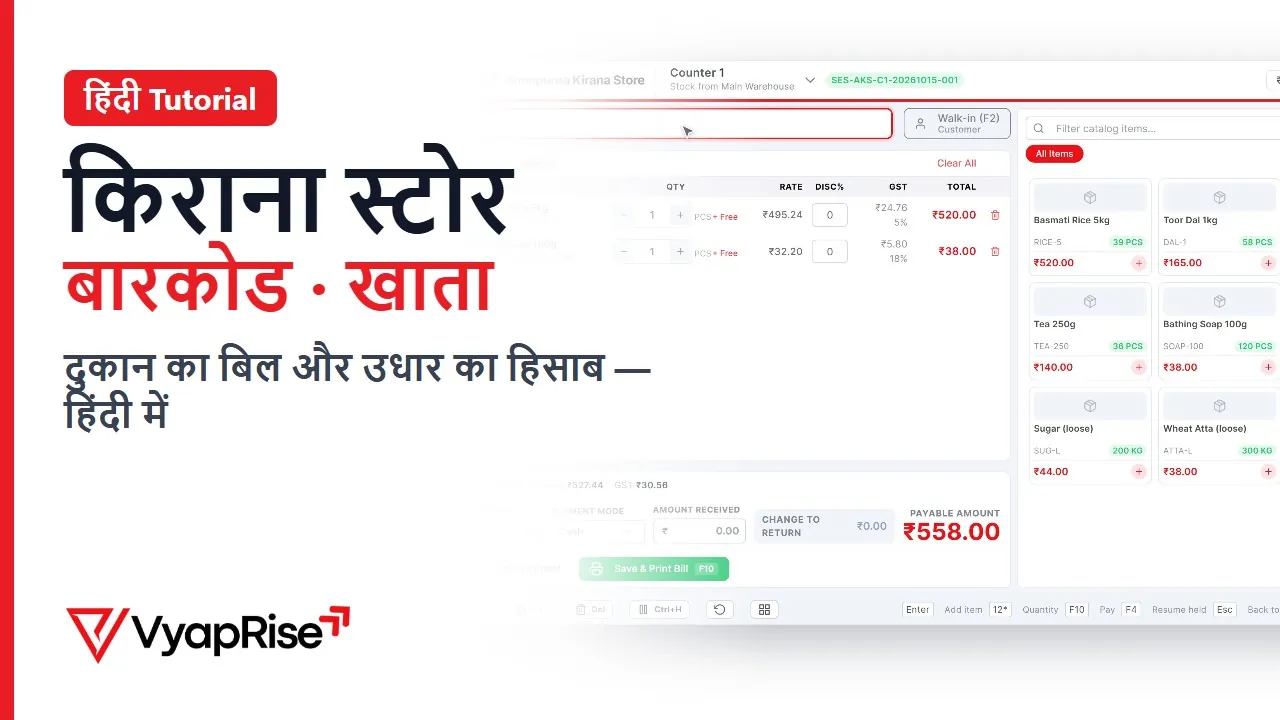
Watch the 2-minute demo
In Hindi, with subtitles. Recorded on a made-up shop, not a real customer.
What a kirana counter needs from billing software
A grocery shop bill is small, fast and frequent. These are the nine jobs VyapRise does at the counter and behind it.
Scan and bill in seconds
Any USB or Bluetooth barcode scanner works. Each beep adds the item with its rate, GST rate and HSN. No scanner? Type two letters of the name or tap a product tile. Counter billing (POS) is a Pro feature.
See the POSUPI, cash and card on one bill
The till shows a UPI QR for the customer to scan. If they pay part by UPI and the rest in cash, enter both amounts, the screen shows the change to return, and the shift total records each mode separately. Receipts print on 80 or 58 mm paper. The till (POS) is part of Pro.
Khata for regular customers
Pick the customer and put the bill on credit. It goes to their ledger, not the cash drawer, so the shift still balances. Set a credit limit and the till warns when a bill crosses it, or asks for the owner's approval if you switch that on. Khata on the till is part of Pro.
Customer ledgerOffers and loyalty points
Set % or ₹ off a category, chosen items or the whole bill, for chosen dates, weekdays or hours, and it applies by itself. Loyalty points, off until you switch them on, are earned on named-customer bills and redeemed inside the bill discount. Offers are Free on invoices; at the till, and loyalty, need the Pro POS.
Returns and exchange at the counter
Press F7, find the bill, return the item, then give cash back or net it against a new bill. Stock goes back on the shelf in the books. Part of the Pro POS.
Low-stock alerts
Set a minimum stock level on each item. When oil, sugar or atta falls below it, the item shows on the Stock Alerts screen and in the bell inside the app, so the next order to the wholesaler is complete.
Physical stock count
Open a count sheet for the godown, count the shelves, enter what you found, and post the differences in one go, so the stock in the software matches the shop. Part of Pro.
Your own barcodes for packed goods
Pack loose dal or dry fruits in-house? Generate an EAN-13 barcode for the item and print labels with name, barcode, MRP and net quantity, on A4 sheets or 50×25 and 38×25 mm rolls through the browser print. Label printing is part of Pro.
Barcode billingGST bill or bill of supply
Registered under regular GST, bills carry CGST and SGST with HSN on each line. Under the composition scheme, the same bill prints as a Bill of Supply with no tax and the composition declaration.
A day at a kirana counter with VyapRise
One ordinary day, with simple numbers, so you can see exactly what the software does.
8:00 in the morning. You open a shift on the counter terminal and enter the float in the drawer: ₹2,000. From now on, every bill, every cash-in and cash-out is counted against this shift.
The first customer. She buys 1.5 kg of loose rice at ₹60 a kg, a 1 litre oil pouch at ₹165, two bars of soap at ₹38 each and a ₹30 packet of biscuits. The oil, soap and biscuits are scanned from their printed barcodes. The rice is an item with the unit KGS, so the cashier searches for it and types 1.5 as the quantity; the line shows ₹90. The bill comes to ₹361. She pays ₹200 by scanning the UPI QR on the till and ₹161 in cash. The cashier enters both, presses the pay key, and the receipt prints on the 80 mm or 58 mm printer. Stock of each item drops at once.
A shopkeeper from the next lane. He wants 12 packets of biscuits for his own counter. On the item you have set a trade price of ₹9 from 12 packets, against ₹10 retail. When the quantity reaches 12, the POS switches the rate on its own and the line reads ₹108. Sell 11 and it stays at retail.
A regular on khata. A family from the building opposite takes ₹640 of groceries and asks you to write it down. The cashier picks them as the customer and puts the balance on credit. The ₹640 goes to their ledger, not to the cash count. You have given them a credit limit of ₹3,000, so the till would warn before a bill takes them past it. On the 1st of the month they pay ₹1,000; on Pro you record the receipt against their bills and the customer ledger shows what is still due. On Pro you can share the statement as a PDF from a phone. On Pro, automatic payment-reminder emails can go out too, and Send on WhatsApp sends a bill to the customer in one press; there are no automatic WhatsApp or SMS reminders.
A return. A customer brings back an unopened packet of the wrong tea. The cashier presses F7, finds the morning's bill, returns the packet and bills the right one, netting the old amount against the new bill. The returned packet is back in stock.
Afternoon, before the wholesaler's call. The Stock Alerts screen lists the 1 litre oil pouch: you set its minimum at 10 and only 7 are left. Two more items are on the list. You place your order with the full list in front of you instead of walking the shelves.
Packing loose dal. In the quiet hour you pack toor dal into 500 g packets. In VyapRise that packet is its own item, with a barcode generated by VyapRise (an EAN-13 starting with 2, meant for your own counter). You print a sheet of 65 labels on A4 paper, or a run on a 38×25 mm roll, with name, barcode, MRP and net quantity, and the packets scan like any branded product from tomorrow. The free barcode generator does the same for a one-off sheet.
9:30 at night. You close the shift. Cash sales were ₹18,450 and you paid ₹500 out of the drawer to the delivery boy, recorded as a cash-out. The Z-report says the drawer should hold ₹19,950. You count it, enter what is actually there, and the shift shows the shortage or surplus. UPI and other non-cash takings are totalled separately, so they can be matched against the bank.
- Every counter bill also reduces stock in the warehouse the terminal is mapped to.
- Each sale posts to the books on its own, so there is no evening entry work.
- An offer such as 5% off the biscuits category on Sundays applies on its own, and named customers earn loyalty points if you have switched them on.
- Bills to customers without a GSTIN are summarised as B2CS in the GSTR-1 report (a Pro report).
Grocery shop billing tasks and how VyapRise handles them
What a kirana shop does every day, where it lives in VyapRise, and which plan it needs. Free is free forever; Pro is ₹1,499 per year.
| Task | How VyapRise handles it | Plan |
|---|---|---|
| Fast counter billing | Full-screen POS with scan bar, product tiles, keyboard shortcuts, hold and recall bills | Pro |
| Barcode scanning | USB or Bluetooth scanner on the POS, sales invoice and purchase bill. No phone-camera scanning | Free on sales invoices; Pro on POS and purchase bills |
| Split payment | Cash, UPI/QR, card, bank and cheque in one POS bill; UPI QR shown on the till | Pro |
| Receipts | 80 mm or 58 mm thermal receipt through the browser print | Pro |
| Khata / udhaar | Credit sale to a named customer, ledger and statement, receipts against bills | Free for the current month (receipts and khata on POS are Pro) |
| Credit control | Credit limit per customer: warn, or need the owner's approval past the limit or overdue days | Free |
| Offers | % or ₹ off a category, items or the bill, with dates, weekdays and hours; Offers report | Free on invoices, Pro on POS |
| Loyalty points | Earned on named-customer bills, redeemed inside the bill discount; off by default | Pro (POS) |
| Returns and exchange | F7 on the POS: find the bill, return items, refund or net against a new bill | Pro (POS) |
| Sales invoice | GST invoice with HSN, a UPI QR to scan and pay, 4 print layouts | Free, 10 a month |
| Bill of supply | Set company GST type to composition and bills print as Bill of Supply | Free |
| Low-stock alerts | Minimum stock per item, Stock Alerts screen, low-stock report, in-app bell | Free |
| Physical stock count | Count sheet per godown, differences posted in one go | Pro |
| In-store barcodes and labels | EAN-13 starting with 2; A4 label sheets from 4 to 65 per page, or 50×25 / 38×25 mm rolls | Pro |
| Purchase from wholesaler | Purchase bill with supplier invoice number, GST input and stock in | Pro |
| Shift close and Z-report | Opening float, cash in/out, expected vs counted cash | Pro |
| GSTR-1, GSTR-3B, P&L | Reports as PDF, CSV or Excel for your CA | Pro |
On Free you can make 10 sales invoices a month. A kirana that bills every customer will pass that in a day or two, so most shops that bill at the counter use Pro.
Getting your shop billing in an afternoon
The real work is your item list. Everything after it takes minutes.
- 01
Add your items
Import a spreadsheet with name, sale price, GST rate, HSN and barcode, or type items in as you go (MRP is set on the item). Loose goods sold by weight get the unit KGS; packed goods get PCS.
- 02
Record barcodes once
Open an item, click into the Barcode field and scan the packet. For items you pack yourself, generate an in-store barcode and print the labels (labels are part of Pro).
- 03
Enter opening stock and minimum levels
Count what is on the shelves and enter it at cost, with a minimum level for the fast movers. Stock then moves with every bill and purchase, and a physical count later posts any difference.
- 04
Create a terminal and open a shift
Name the counter, choose the godown its stock comes from and the bill prefix, enter the float, and start billing.
Is VyapRise right for your grocery shop?
An honest answer saves you a wasted setup.
A good fit if you
- Run a kirana, general store or mini-mart with one or more counters and a PC, laptop or Android tablet
- Want barcode billing plus loose goods by weight on the same bill
- Keep khata for regular customers and want it out of the notebook, see how to keep udhaar records
- Want offers, loyalty points and counter returns without a separate system
- Want stock, purchases and GST reports in the same place as billing
- Need more than one cashier login on Pro without paying per user
Not a fit yet if you
Need expiry alerts by SMS or WhatsApp: VyapRise sends none. On Pro the sale takes the earliest-expiring batch, the Expiring Stock report lists what runs out next, and the automatic daily email lists stock expiring within 30 days. VyapRise does not connect to a weighing scale: if your scale prints barcode labels, scanning the label bills the item and its weight, otherwise the cashier types the weight. There is no native Android or iPhone app and no offline mode: it runs in a browser and needs internet, so keep a mobile hotspot as backup. Receipts and roll labels print through the browser; there is no printer-specific driver.
Checklist before you buy kirana shop billing software
Whichever software you choose, check these at your own counter during the trial.
- Your existing scanner adds items without any driver
- Loose goods can be billed in decimals, such as 0.75 kg
- A bill can be split across UPI and cash
- Khata balances flow into a customer ledger you can share
- Low-stock items show up without you checking each shelf
- Your own packed goods can get barcodes and printed labels
- A return or exchange at the counter puts the item back in stock
- Composition shops get a proper bill of supply, see bill of supply vs tax invoice
- The shift closes with an expected cash figure to count against
- There is no charge per counter or per cashier
- You know what happens when the internet goes down
Common questions
Is this kirana store billing software free?
Partly. The Free plan, free forever, covers sales invoices (up to 10 a month), up to 30 items and 10 customers, stock in one warehouse, barcode scanning, low-stock alerts, offers on invoices, credit limits and customer ledgers for the current month, for the owner alone. Purchase bills, stock counts, the counter POS with split payments, UPI QR on the till, khata on the bill, returns, loyalty points and Z-reports, barcode labels and cashier logins are part of Pro at ₹1,499 per year. Every new company can try Pro free for 7 days.
Can I bill loose items like rice and dal by weight?
Yes. Create the item with the unit KGS and type the weight as the quantity, for example 1.5 or 0.25. To sell the 30 kg bag as well, add BAG = 30 KGS as another unit on the same item (with its own bag price if you like); stock stays in kilos. If your weighing scale prints EAN-13 barcode labels, turn on Weighing scale labels in Invoice Settings and scanning the label bills the item and its weight; otherwise the cashier types it.
Can I run offers and loyalty points for my customers?
Yes. An offer is % or ₹ off a category, chosen items or the whole bill, limited to dates, weekdays or hours, and it applies by itself; it works on invoices on Free and at the till with the Pro POS. Loyalty points are a Pro POS feature: switch them on, customers earn points on bills in their name, and redeem them inside the bill discount.
Is there a kirana shop billing app for Android?
There is no VyapRise app on the Play Store. VyapRise runs in the browser on an Android phone or tablet, and you can add it to the home screen like an app. It needs an internet connection to bill.
Does it track expiry dates of grocery items?
Yes, on Pro. Enter the batch and expiry on the purchase bill; each sale takes the earliest-expiring batch and skips expired ones, the Expiring Stock report lists what expires within the days you choose, and the automatic daily email lists stock expiring within 30 days. There are no SMS or WhatsApp alerts. When printing barcode labels you can also type an expiry date for that print run.
I am under the composition scheme. Can I use it?
Yes. Set your company GST type to composition and sales bills print as a Bill of Supply with no tax charged and the composition declaration. Confirm your eligibility and rate with your CA.
Which barcode scanner and printer do I need for grocery shop billing?
Any USB or Bluetooth scanner that types like a keyboard, which is most of them. For receipts, an 80 mm or 58 mm thermal printer through the browser. For barcode labels, an ordinary printer with A4 label sheets, or a label printer with 50×25 or 38×25 mm rolls, also through the browser print.
Can two cashiers bill at the same time?
Yes. Create a terminal for each counter. Each runs its own shift and Z-report, and users are unlimited on Pro with no per-user charge.
Related pages
- POS billing softwareThe counter screen in detail: shortcuts, shifts, returns, hardware.
- Barcode billing softwareScanning, in-store EAN-13 codes and labels on A4 or rolls.
- Inventory management softwareStock, godowns, low-stock alerts and stock reports.
- Free barcode generatorPrint a sheet of barcode labels without signing up.
- Which kirana billing software to chooseA buyer's guide in Hinglish.
- Customer ledgerKhata, statements and outstanding balances.
- Medical store billing softwareBatch & expiry, strips and loose tablets.
Put your kirana counter on VyapRise
Add your items, scan your barcodes and open a shift. Try Pro, including the POS, free for 7 days; no card needed.