
For garment and footwear shops
Garment Shop Billing Software for Every Size and Colour
A shirt is not one item: it is eight sizes in four colours.
- Size × colour variants, each with its own stock
- GST rate switches by price on its own
- Labels from the purchase bill, A4 or roll
- Scan, bill and exchange at the counter
What is Garment Shop Billing Software?
VyapRise lets you create the shirt once, list its sizes and colours, and makes each combination its own item with its own stock and barcode, so you know there are two Medium Blue left, not just "some shirts".
Enter a delivery in one size × colour grid, print a label for every piece straight from the purchase bill, scan it at the counter, and let the GST rate switch by the price of the piece on its own. Run a weekend offer, take an exchange at the till, and give the retailer from the next town a wholesale rate from a dozen pieces. Choose Garments & Footwear when you sign up. Variants, labels, purchase bills, consignment stock and the counter POS are part of Pro; GST rate by price and offers on invoices work on Free. Try Pro free for 7 days.
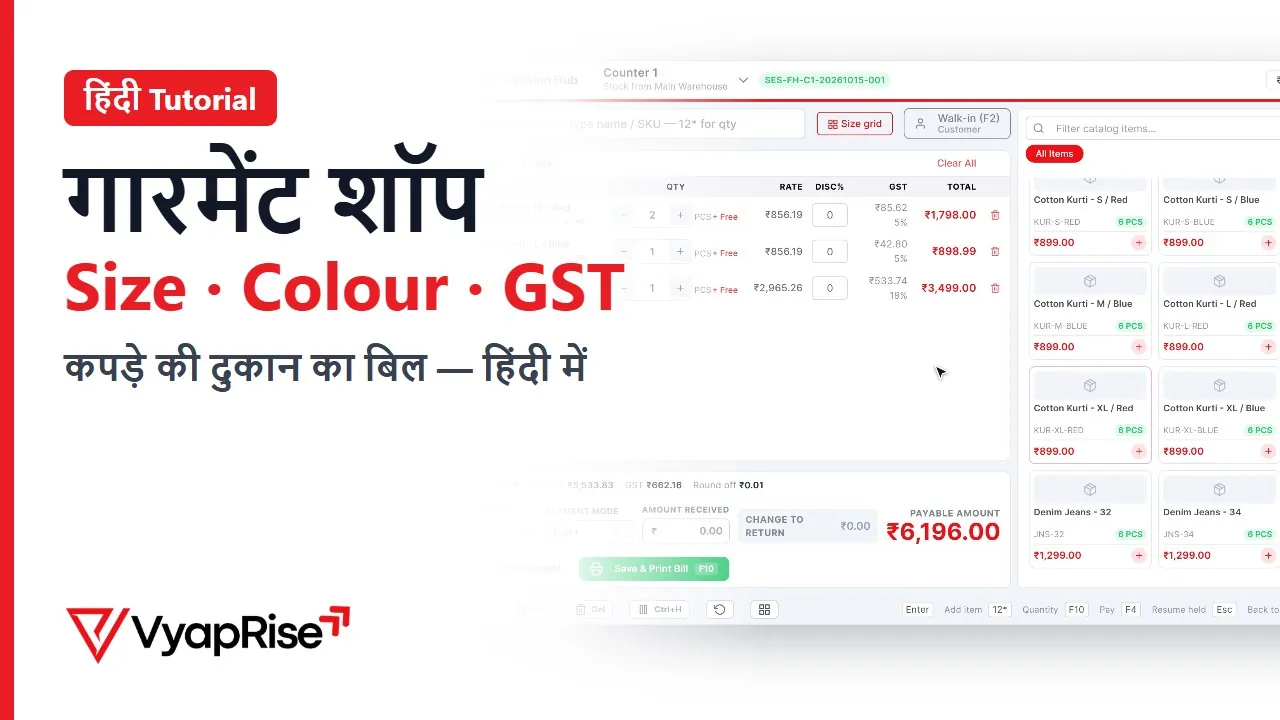
Watch the 2-minute demo
In Hindi, with subtitles. Recorded on a made-up shop, not a real customer.
What a garment shop needs from billing software
Sizes and colours in one step
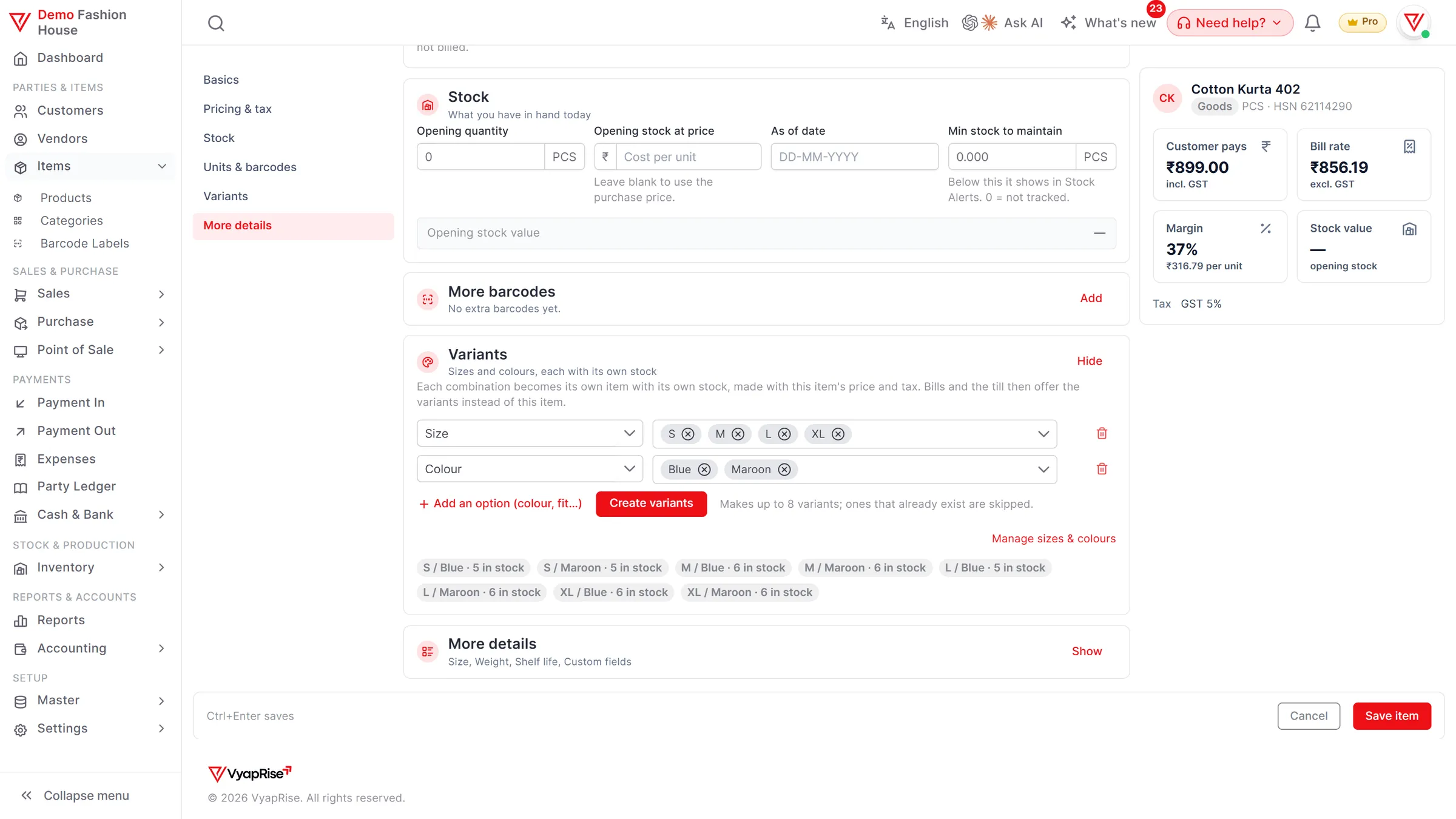
On the new-item page, list up to three options, such as Size and Colour, with their values. Save, and VyapRise makes every combination its own item, copying the price, GST, unit and category, so S-Red and XL-Black each have their own stock. Variants are a Pro feature.
A size × colour grid on the bill
Type quantities for all sizes and colours of a style in one grid on the purchase bill, the invoice and the till, instead of adding a line per size. Part of variants, on Pro.
Stock by size, not by style
Purchases and sales move the exact size and colour. The Stock by Size report shows which sizes are selling and which are stuck, so the next order to the manufacturer is for the sizes that actually move.
Labels from the purchase bill
Press Print labels on a purchase bill and the label screen opens with the pieces received and their MRP. Print A4 sheets or 50×25 and 38×25 mm rolls through the browser print. Barcode labels are part of Pro.
Barcode billingScan, exchange and reward at the counter
Scan the tag and the right size and colour lands on the bill. Press F7 to take a return or an exchange against the old bill, refund cash or net it against the new one, and give named customers loyalty points if you switch them on. The POS is part of Pro.
See the POSGST rate by price
Set a per-piece value on the item, with one GST rate up to it and another above it. The rate switches on its own on the invoice and at the till, by the price of each piece. Works on Free.
Offers that apply themselves
Set % or ₹ off a category, chosen items or the whole bill, with dates, weekdays and hours. The offer applies by itself, and the Offers report shows how many bills each offer was used on and the discount it gave. Free on invoices; on the till with the Pro POS.
Wholesale rate from a quantity
Set a wholesale price and a minimum quantity on the item. At the counter (POS, Pro) the trade rate applies on its own once a line reaches that quantity; on an invoice, edit the rate or put the customer on a price list (Pro).
Consignment stock from suppliers
Take a supplier's goods on sale or return into their consignment godown: not your stock, no payable. Sell as usual, then once a month make one purchase bill for what sold and return the rest. Pro.
From delivery to counter, one style
One kurta style in a shop, step by step.
The style. You create "Cotton Kurta 402" at ₹899 and, on the same page, choose Size with S, M, L, XL and Colour with Blue and Maroon. On save VyapRise makes 8 items, from "S / Blue" to "XL / Maroon", each priced at ₹899.
The delivery. The manufacturer sends 3 of each: 24 pieces. On the purchase bill you open the size × colour grid for the style and type 3 in each box. Then Print labels opens with 24 labels and the MRP filled in, and you print them on an A4 sheet or a 50×25 mm roll and tag the pieces.
The counter. A customer takes M / Maroon and L / Blue. The cashier scans both tags: two lines, ₹1,798, and stock of those two variants drops by one each. It is Saturday, so your weekend offer of 10% off the kurta category applies on its own.
An exchange. Next day she brings back the L / Blue for an XL. The cashier presses F7, finds Saturday's bill, returns the L, scans the XL and nets the old amount against the new bill. Stock of both sizes is right again.
The weekend check. The Stock by Size report shows M and L almost gone in both colours, while XL has not moved. Your reorder is 6 M and 6 L in each colour, and no XL.
A retailer at the counter. A shopkeeper from the next town picks up 12 pieces of S / Blue. You have set a wholesale price of ₹720 from 12 pieces on that item, so when the POS line reaches 12 it switches to ₹720 a piece on its own.
- Each variant is a normal item, so it bills, stocks and labels like any other.
- Up to 3 options, 30 values each and 200 combinations per style.
- Socks in a box of 12? Add BOX = 12 PCS as another unit, buy by the box and sell single pairs; other units work on every plan.
Garment shop tasks and how VyapRise handles them
Free is free forever; Pro is ₹1,499 per year.
| Task | How VyapRise handles it | Plan |
|---|---|---|
| Size / colour variants | Up to 3 options, made on save from the new-item page; each combination is its own item with its own stock | Pro |
| Size × colour grid | Quantities for a whole style in one grid on the purchase bill, invoice and till | Pro |
| Stock by size | Stock by Size report across a style's sizes and colours | Pro |
| Barcode labels | From a purchase bill or the label screen; A4 sheets (4 to 65 a page) or 50×25 / 38×25 mm rolls through the browser print | Pro |
| GST rate by price | One rate up to a per-piece value, another above it, switched on its own on the invoice and the till | Free |
| Offers | % or ₹ off a category, items or the bill, with dates, weekdays and hours; Offers report | Free on invoices; till with Pro |
| Counter billing | POS with scan bar, UPI + cash split, shifts and Z-report | Pro |
| Returns and exchange | F7 on the POS: find the bill, return items, refund or net against a new bill | Pro (POS) |
| Loyalty points | Earned on named-customer bills, redeemed inside the bill discount; off by default | Pro (POS) |
| Wholesale rate | A lower price from a minimum quantity, applied on its own at the POS | Pro (POS) |
| Consignment (sale or return) | Supplier's goods in their own godown; one purchase bill a month for what sold | Pro |
| Box and piece | Other units with their own price; stock in pieces | Free |
| GST invoice | HSN and GST on each line, 4 print layouts | Free, 10 a month |
| Purchase from manufacturer | Purchase bill with GST input and stock in | Pro |
GST rate by price uses the value and the two rates you set on the item. Confirm the current rates and the per-piece limit for clothing and footwear with your CA.
Is VyapRise right for your garment shop?
The honest version.
A good fit if you
- Sell readymade garments, footwear or textiles in several sizes and colours
- Want stock per size and colour, not per style
- Want a barcode tag on every piece, scanning at the counter and exchanges without a manual credit note
- Sell both retail and to other shops at a trade rate
- Take some stock from suppliers on sale or return
Not a fit yet if you
Sell fabric by the metre from a roll: it can be billed in metres, but there is no roll or cut-length tracking. Roll labels (50×25 and 38×25 mm) print through the browser's print dialog; there is no printer-specific driver. Tags are scanned with a USB or Bluetooth scanner, not a phone camera, and there is no native Android app or offline mode; it runs in the browser and needs internet.
Common questions
Can I manage size and colour stock for each item?
Yes, on Pro. Create the style with up to three options, such as Size and Colour, and VyapRise creates each combination as its own item with its own stock, barcode and price copied from the style. A size × colour grid lets you enter a whole style on one bill, and the Stock by Size report shows what is left in each size.
Can I print barcode tags for my clothes?
Yes, on Pro. Press Print labels on a purchase bill to get one label per piece received with its MRP, or print from the label screen. Use A4 sheets (4 to 65 labels a page, or a custom size) or the 50×25 and 38×25 mm roll presets through the browser print.
Does it change GST by the price of the garment?
Yes. Set a per-piece value on the item with one GST rate up to it and another above it, and the rate switches on its own on the invoice and at the till. This works on Free. Confirm the current rates and limit with your CA.
Can I take returns and exchanges at the counter?
Yes, on the Pro POS. Press F7, find the old bill, return the items, then refund cash or net the amount against a new bill. A return window can be set so old bills are not taken back.
Can I give a wholesale rate to other shops?
Yes. Set a wholesale price and a minimum quantity on the item; at the counter POS (Pro) the wholesale rate applies on its own when a line reaches that quantity. For regular trade customers, Pro also has customer price lists, so their invoices take their own rate. On any plan you can edit the rate on an invoice line.
How much does garment shop billing software cost on VyapRise?
Variants, barcode labels and the counter POS (with returns, exchange and loyalty) are part of Pro, at ₹1,499 per year, with unlimited users. Purchase bills and consignment stock are Pro too; GST rate by price and offers on invoices work on Free. Every new company gets 7 days of Pro free, no card needed.
Related pages
- Barcode billing softwareScanning, in-store barcodes and labels on A4 or rolls.
- POS billing softwareCounter billing, split payments, exchange and shifts.
- Inventory management softwareStock, low-stock alerts and reports.
- Free barcode generatorPrint a sheet of labels without signing up.
- GST billing softwareGST invoices with HSN and UPI QR.
Put your garment shop on VyapRise
Choose Garments & Footwear, create your first style in every size and colour, and print the tags. Try Pro free for 7 days; no card needed.