
For utensils, crockery and kitchen appliance shops
Utensils and Kitchenware Shop Billing Software with Barcode
A utensils shop sells steel by weight, crockery by the piece and the set, and mixers and cookers that come with a warranty card. Most of it has no barcode, and the wedding season brings a rush at the counter.
- Your own barcode labels for unmarked items
- Steel by kg, crockery by piece or set
- Appliance serials with warranty dates
- Fast counter billing in the wedding rush
What is Kitchenware & Utensils Billing Software?
VyapRise is kitchenware billing software that prints your own barcode labels for every plate and bowl, sells steel by the kg or the piece, records the serial and warranty of each appliance, and bills a full counter quickly.
Choose Kitchenware & utensils when you sign up. Other units, brand & rack, barcode scanning on invoices and offers work on Free; barcode labels, serial numbers with warranty, variants, gift sets and the counter POS are part of Pro, free for your first 7 days.
What a utensils and kitchenware shop needs from billing software
Unmarked goods, items sold by weight, numbered appliances and a crowded counter.
Barcode labels for every item
Plates, bowls and glasses rarely carry a barcode. Generate an in-store EAN-13 code for each item and print label sheets on A4 (4 to 65 a page) or 50×25 and 38×25 mm rolls through the browser print. Barcode labels are part of Pro.
Barcode billingScan to bill
Scan the label, or the manufacturer's barcode on an appliance box, with a USB or Bluetooth scanner and the item lands on the bill. Scanning works on Free invoices; the POS is Pro.
By kg or by piece
Sell a steel kadai by weight, such as 1.250 kg, and a steel glass by the piece. Keep glasses in pieces and add DOZEN = 12 PCS as another unit, with its own price if you like; stock stays in pieces. Other units work on every plan.
Serials on appliances
Record the serial of each mixer, cooker, induction or chimney on the purchase bill and pick it on the sale. It prints on the bill with the warranty end date when the item has warranty months. Pro.
Sizes and colours
A cooker in 3, 5 and 7 litres, or a dinner set in two colours: create the product once with its options and each combination gets its own stock and barcode. Variants are a Pro feature.
Gift sets
Sell a wedding gift set of a kadai, a tope and a ladle as one line; the sale takes each piece out of stock. Kits are a Pro feature; items with serials cannot go in a kit.
Brand and rack
Keep the brand and rack on each item, along with HSN, GST rate and MRP, and import the list from Excel (up to 30 items on Free). Brand & rack works on every plan.
A fast counter
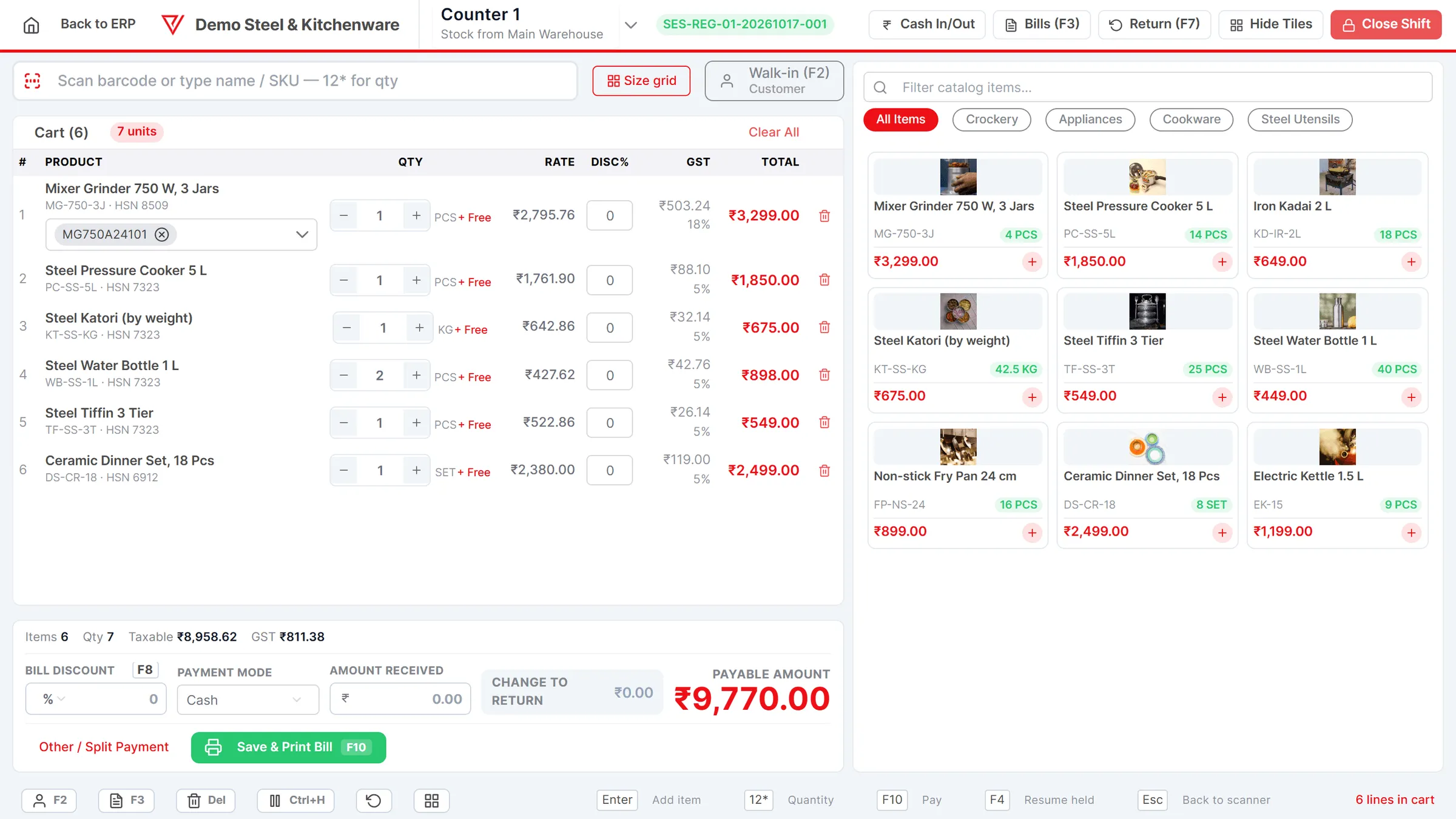
The Pro POS takes scan or search, holds a bill while the customer picks more, splits cash, UPI and card, and applies a wholesale price from a quantity you set. Offers for the season apply by themselves.
See the POS
A Saturday at a utensils shop
Simple numbers, real steps.
Before opening. Yesterday's delivery of steel plates and bowls is in. From the purchase bill you press Print labels, and the label screen opens with one label per piece received and the MRP filled in. Your staff stick them on the pieces before the shutter goes up.
A wedding order. A family buys 51 steel plates, 51 bowls, a big kadai by weight and three gift sets. The plates and bowls are scanned once each and the quantity typed; the kadai is weighed and entered as 2.400 kg. The gift sets come out of stock piece by piece.
An appliance sale. The next customer buys a mixer at ₹3,499. You pick its serial; the bill prints it with the warranty end date.
A held bill. A customer is still choosing glasses, so the cashier holds her bill and serves the next one, then recalls it when she is ready.
Evening. The low-stock screen shows the 5 litre cooker below its minimum level. The Z-report closes the shift with cash, UPI and card totals.
- Steel utensils, crockery and appliances can carry different GST rates; set the HSN and rate on each item after confirming them with your CA.
- There is no link to a weighing scale: weights are typed in, or a barcode label printed by the scale is scanned on the sales invoice.
Utensils shop tasks in VyapRise
Free is free forever; Pro is ₹1,499 per year.
| Task | How VyapRise handles it | Plan |
|---|---|---|
| Labels for unmarked items | In-store EAN-13 codes; A4 sheets or 50×25 / 38×25 mm rolls; labels from a purchase bill | Pro |
| Scan billing | USB or Bluetooth scanner on the invoice and the POS | Free on invoices |
| Kg and piece | Decimal quantities; other units such as DOZEN = 12 PCS | Free |
| Appliance serials and warranty | Serial per piece, printed with warranty date; Warranty Expiring report | Pro |
| Sizes and colours | Variants, each with its own stock and barcode | Pro |
| Gift sets | Kits sold as one line, issuing each component's stock | Pro |
| Brand and rack | On each item, imported from Excel | Free |
| Season offers | % or ₹ off a category, items or bill with dates and hours | Free on invoices; POS Pro |
| Counter billing | POS with hold and recall, split payment, shifts and Z-report | Pro |
| GST invoice | HSN and GST per line, UPI QR, 4 print layouts | Free, 10 a month |
Is VyapRise right for your utensils shop?
The honest version.
A good fit if you
- Sell many unmarked items and want a barcode on each, see barcode label printing
- Sell steel by weight and crockery by the piece or dozen
- Sell appliances that need a serial and warranty on the bill
- Get crowds in the wedding season and want a quick counter
Not a fit yet if you
Need a weighing-scale link: VyapRise does not connect to the scale. If your scale prints barcode labels, turn on Weighing scale labels in Invoice Settings and scan them on the sales invoice; otherwise weights are typed in. Labels print through the browser's print dialog, with no printer-specific driver. Barcode scanning is with a USB or Bluetooth scanner, not a phone camera. It runs in the browser and needs internet; there is no offline mode.
Common questions
Can I print barcode labels for utensils that have no barcode?
Yes, on Pro. Generate in-store EAN-13 codes for your items and print labels on A4 sheets (4 to 65 a page) or 50×25 and 38×25 mm rolls through the browser print. From a purchase bill, Print labels opens with one label per piece received.
Can I sell steel utensils by weight?
Yes. Quantities can have decimals, so a kadai can be billed as 2.400 kg. There is no link to a weighing scale: weights are typed in, or a barcode label printed by the scale is scanned on the sales invoice.
Can I track warranty on mixers and cookers?
Yes, on Pro. Record each appliance's serial on the purchase bill and pick it on the sale. With warranty months on the item, the bill prints the warranty end date, and the Warranty Expiring report lists pieces near the end.
Can I sell a gift set as one item?
Yes, on Pro. Make a kit of the pieces in the set and sell it as one line; the sale takes each piece out of stock. Items with serial numbers cannot be part of a kit.
How much does utensils shop billing software cost?
The Free plan is free forever with 10 GST invoices a month, up to 30 items and 10 customers, other units and barcode scanning on invoices, for the owner alone. Labels, serials, variants, kits, purchase bills and the POS are part of Pro, at ₹1,499 per year, with unlimited users. New companies get 7 days of Pro free.
Related pages
- Barcode billing softwareIn-store barcodes, label sheets and scanning.
- POS billing softwareCounter billing, hold and recall, shifts.
- Free barcode generatorPrint a sheet of labels without signing up.
- Kirana store billing softwareLoose goods by weight at a busy counter.
- Inventory management softwareStock, low-stock alerts and reports.
Put your utensils shop on VyapRise
Choose Kitchenware & utensils, print labels for your shelves and start scanning. Try Pro free for 7 days; no card needed.