
For optical shops and opticians
Optical Shop Billing Software with Eye Prescriptions
At an optical shop the sale starts with the eyes, not the frame: an eye test, a prescription for each eye, a frame picked from the display in the right size and colour, and lenses that come from the lab two days later.
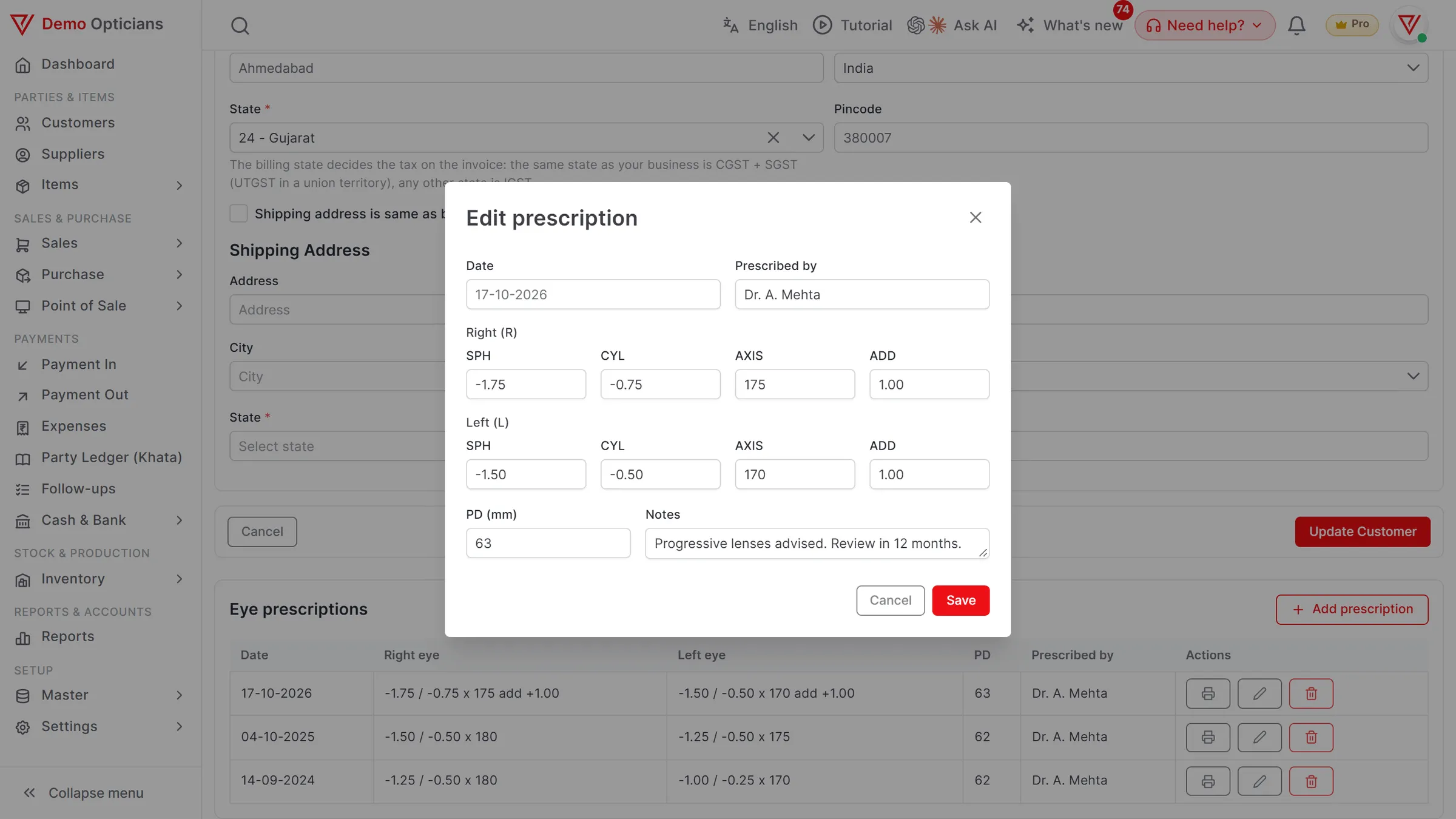
- SPH, CYL, AXIS and ADD for each eye, kept on the customer
- A printed prescription slip (PDF)
- Frames by size and colour, each with its own stock
- Spectacle orders with an advance, billed on delivery
What is Optical Shop Billing Software?
VyapRise is optical shop billing software that keeps every customer's eye prescriptions on their page, newest first, prints a prescription slip, keeps frames as size and colour variants with their own stock, and books the spectacle order with an advance so the invoice on delivery leaves only the balance.
Choose Optical shop when you sign up and the Eye prescriptions switch is on. Prescriptions, brand & rack, repair jobs and GST invoices work on Free; variants, sale orders, receipts, labels and the counter POS are part of Pro, free for your first 7 days.
What an optical shop needs from billing software
A record of each customer's eyes, frames in many sizes and colours, orders delivered days later and the odd repair. These are the parts that matter.
Eye prescriptions on the customer
On the customer's page, add a prescription with the date, who prescribed it, SPH, CYL, AXIS and ADD for the right and left eye, the PD and notes. Each visit adds another, listed newest first, so last year's numbers are a click away. Works on every plan.
A printed prescription slip
Print any prescription as a PDF slip for the customer or the lens lab. The prescription is kept on the customer and printed on its own slip; it does not print on the sales invoice.
Frames by size and colour
Create a frame model once with options such as Size (52-18-140) and Colour, and each combination becomes its own item with its own stock and barcode. Variants are a Pro feature.
How variants workBrand and rack
Each frame, lens and solution carries its brand, the drawer or rack it is kept in, HSN, GST rate and MRP. Search by name, code or barcode while billing. Brand & rack works on every plan.
Spectacle orders with an advance
The customer chooses a frame and lenses today and collects the glasses later. Book it on a sale order with the expected delivery date, take the advance as a payment received, and adjust it on the invoice when the glasses are handed over. Sale orders and receipts are part of Pro.
Sale ordersRepairs and fittings
Open a job for a frame repair, a lens refit or a new nose pad with the item, the problem, an advance and the status. Add the part and the service charge, press Bill this job, and the invoice fills itself. Repair jobs work on Free.
Labels and counter billing
Print price labels with an in-store barcode for frames and sunglasses, and scan them at the Pro POS with cash, UPI and card on one bill. Labels are part of Pro.
Barcode labelsEye tests and GST invoices
Keep eye testing as a service item with its SAC, and frames, lenses and contact lens solution as goods, each with its own GST rate. The invoice splits tax line by line and carries a UPI QR code. Free, 10 invoices a month.
One week at an optical shop using VyapRise
Simple numbers, real steps, so you can see whether it fits how your shop works.
Monday: an eye test. A customer comes in for new glasses. After the test you open his page and add a prescription: right eye SPH -1.25, CYL -0.50, AXIS 180; left eye SPH -1.00, CYL -0.75, AXIS 170; ADD +1.50 for both eyes and PD 62, prescribed by your optometrist. You print the slip.
Monday, ten minutes later: the order. He picks a frame in size 52-18-140 in black, with progressive lenses. You make a sale order for Thursday and take a ₹2,000 advance by UPI as a payment received. The printed slip goes to the lens lab with the order.
Wednesday: a repair. A regular customer's frame has lost a screw and a nose pad. You open a repair job, fix it in ten minutes, add the part and a ₹50 service charge and press Bill this job.
Thursday: delivery. The glasses are ready. You bill the sale order; the frame variant's stock drops by one, the ₹2,000 advance is adjusted on the invoice, and he pays the balance.
A year later: the next test. He comes back. His page shows last year's prescription at the top of the list, so you can compare before you test, and the new one goes above it.
- GST rates on spectacles and lenses changed on 22 September 2025. Keep each item's HSN and rate, and confirm them with your CA.
- Contact lenses and solutions with expiry dates can carry a batch and expiry date, picked earliest first on the bill. Batch and expiry are part of Pro.
- On Free you can keep up to 10 customers in all, prescriptions included; Pro has no customer limit.
Optical shop tasks and how VyapRise handles them
Free is free forever; Pro is ₹1,499 per year.
| Task | How VyapRise handles it | Plan |
|---|---|---|
| Eye prescriptions | Date, prescribed by, SPH / CYL / AXIS / ADD for each eye, PD and notes on the customer; newest first | Free |
| Prescription slip | Printed as a PDF on its own slip, not on the invoice | Free |
| Frames | Size and colour variants, each with its own stock and barcode | Pro |
| Brand and rack | Brand, drawer or rack, HSN, GST and MRP on each item | Free (30 items) |
| Spectacle orders | Sale order with the delivery date; advance as a payment received, adjusted on the invoice | Pro |
| Repairs | Repair job with the item, problem, advance and status; Bill this job | Free |
| Counter billing | POS with scan, UPI + cash + card on one bill, 80 / 58 mm receipts | Pro |
| Price labels | In-store EAN-13 codes on A4 sheets or 50×25 / 38×25 mm rolls | Pro |
| GST invoice | HSN or SAC and GST on each line, UPI QR, 4 print layouts | Free, 10 a month |
On Free you make 10 sales invoices a month as the owner alone, with up to 10 customers and 30 items.
Is VyapRise the right optical shop software for you?
Before you set it up, the gaps.
A good fit if you
- Test eyes, or take prescriptions from doctors, and want them kept on each customer
- Sell frames in many sizes and colours and want stock for each
- Take spectacle orders with an advance and deliver them later
- Do small repairs and fittings and want the job to become the invoice
- Give regular customers credit, tracked in the customer ledger
Not a fit yet if you
Need the prescription printed on the invoice: it prints on its own slip. There is no lens power grid for stock (lenses by SPH and CYL in one table) and no separate lens-lab job screen; keep lenses as items and send the slip with the order. Eye-test appointments are a separate Pro module you can switch on in Settings › Business Type; there is no SMS and no automatic reminder for the next eye test (a booked appointment has a Remind button that opens WhatsApp with the message filled in; you press send). Barcodes are read with a USB or Bluetooth scanner, not the phone camera. It runs in the browser and needs internet.
Common questions
Can I save a customer's eye prescription in VyapRise?
Yes, on every plan. With the Optical shop business type, the customer's page has Eye prescriptions: add the date, who prescribed it, SPH, CYL, AXIS and ADD for the right and left eye, the PD and notes. Each new visit adds another, listed newest first.
Does the prescription print on the bill?
No. It prints on its own prescription slip (PDF), which you can give the customer or send to the lab. The sales invoice shows the frame, the lenses and the charges with GST.
Can I keep stock of frames by size and colour?
Yes, on Pro. Create the frame once with options such as Size and Colour, and each combination becomes its own item with its own stock, barcode and label.
Can I take an advance on a spectacle order?
Yes, on Pro. Book the order on a sale order with the delivery date and take the advance as a payment received. When the glasses are handed over, bill the order and adjust the advance on the invoice, so only the balance is collected.
How much does optical shop billing software cost on VyapRise?
The Free plan is free forever: 10 GST invoices a month, 30 items and 10 customers, with eye prescriptions, brand & rack and repair jobs, for the owner alone. Variants, sale orders, receipts, labels, the POS, purchase bills and staff users are part of Pro, at ₹1,499 per year, with no per-user charge. New companies get 7 days of Pro free.
Does it work on a phone?
Yes, in the phone's browser at app.vyaprise.com, and you can add it to your home screen. It needs internet; there is no offline mode and no Play Store app.
Related pages
- POS billing softwareCounter billing with split payments and shifts.
- Garment shop billing softwareSize and colour variants, each with its own stock.
- Sales and purchase order softwareSale orders, quotations and challans.
- Barcode billing softwareScanning, in-store barcodes and label sheets.
- Customer ledgerCustomer balances, statements and dues.
Run your optical shop on VyapRise
Choose Optical shop, add your frames as variants and save your next customer's prescription. Try Pro free for 7 days; no card needed.