
Reports & Analytics
48 Reports, From the Entries You Already Made
Filing returns, chasing payments and closing the books all need the same thing — numbers you can trust without rebuilding them in a spreadsheet. Every report below is generated from the invoices and vouchers you already entered. Sales and stock reports, party ledgers and outstanding for the current month are in the Free plan; purchase reports, any period, report downloads, financial statements, GST reports, expense and bank reports are part of Pro.
Any date range
No archiving and no cut-off on Pro: run last month or three years ago. The Free plan shows the current month.
PDF, Excel & CSV export
Share with your CA, or carry on working on the numbers yourself. Exports are part of Pro.
No row limits
Reports have no row limits on any plan, and no export cap on Pro.
GST & Compliance
5 reports
Everything your accountant asks for at filing time, generated from the invoices you already raised. Part of Pro.
GSTR-1
Outward supplies, B2B and B2C, as PDF, CSV or Excel, with a check before filing.
GSTR-3B
Monthly summary return with tax payable and input credit.
GSTR-2B Reconciliation
Match the portal's purchase data against your own bills and spot what is missing.
HSN Summary
HSN-wise quantity, taxable value and tax, as GSTR-1 needs it.
TDS Register
TDS deducted by your customers and on your supplier payments, by party and quarter, to match with Form 26AS.
Sales
13 reports
Who is buying, what is selling, what came back, and what the discounts actually cost you.
Sales Register
Every outward invoice for the period, ledger style, with a running balance.
Sales Tax Register
Invoice-wise taxable value, CGST, SGST and IGST.
Sales Summary
Monthly and quarterly totals, with tax and outstanding rolled up.
Sales by Customer
Revenue, invoice count and dues, ranked by customer.
Sales by Salesman
Bills, dues, collections and commission for each salesman.
Sales by Product
Quantity and value sold per item, with average rate.
Sales by Category
Net sales grouped by product category, so a whole line can be judged at once.
Sales Trend
Month-on-month movement so seasonality is visible.
Sales Return Register
Credit notes raised against sales, each showing the invoice it reverses.
Discount by Party
How much invoice discount each customer has been given.
Discount by Item
Line discount given on each product, so a leaking rate shows up.
Offers Report
What each offer sold and how much discount it gave.
Schedule H1 Register
Schedule H1 medicines sold, with patient, doctor and batch, for a chemist shop.
Purchase
5 reports
The inward side — what you ordered, what arrived, what went back, and what is still to pay. Part of Pro.
Purchase Register
Every supplier bill for the period, with a running balance.
Purchase Order Register
Orders by order date, and whether each has been billed yet.
Purchase Return Register
Debit notes against supplier bills, and the input credit each reverses.
Purchase Tax Register
Bill-wise input tax, ready to reconcile with GSTR-2B.
Supplier Outstanding
Unpaid purchase bills per vendor.
Financial Statements
7 reports
Proper double-entry statements, not just totals — the same figures your CA would prepare. Part of Pro.
Trial Balance
Every ledger account with its closing debit and credit balance.
Balance Sheet
Assets, liabilities and equity as at any date.
Profit & Loss (Ledger)
The real P&L: income against expenses from posted journal entries, traceable account by account.
Sales vs Purchases
A quick trading view — taxable sales less supplier bills. It leaves out stock costs and operating expenses, so read the ledger P&L for the real margin.
Cost Centre P&L
Profitability split by department, machine or project.
Cash Flow
Money in and out of your bank accounts, with a running balance.
Day Book
Every voucher posted on a day, in one chronological list.
Receivables & Collections
5 reports
The reports that get money collected — who owes you, for how long, and who you owe.
Receivables Ageing
Outstanding bucketed 0-30, 31-60, 61-90 and beyond, per customer.
Payables Ageing
The same view for what you owe your suppliers.
Customer Aging
Ageing opened out invoice by invoice.
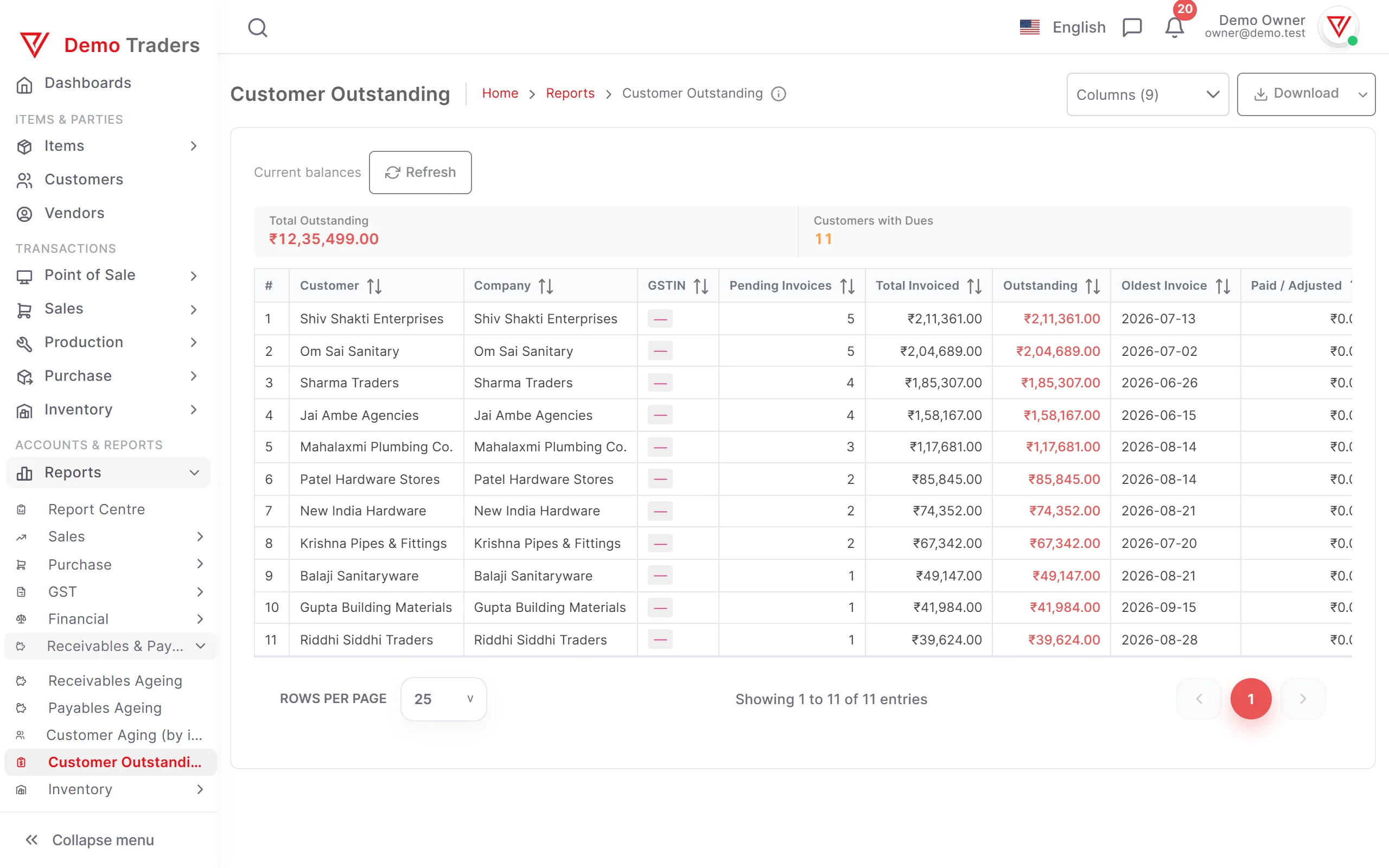
Customer Outstanding
Pending invoice count and total dues per customer.
Customer Ledger
Running account statement, shareable on WhatsApp.
Inventory & Item Profit
9 reports
What is on the shelf, what moved, what needs reordering — and which items actually make money.
Stock Summary
Closing quantity and stock value per item, across warehouses.
Stock Movement
Opening, inwards, outwards and closing quantity per item.
Stock by Category
Current stock and its value per category.
Low Stock
Items at or below reorder level, with the shortfall to order.
Expiring Stock
Batches in stock that expire within the days you choose, expired ones included, soonest first. Needs Pro batch tracking.
Warranty Expiring
Sold serial numbers whose warranty ends soon. Needs Pro serial tracking.
Stock by Size
Each style laid out by size and colour, with the stock of each. Needs Pro variants.
Item Profit & Loss
Profit per item: net sales less the cost of the stock that left.
Category Profit & Loss
The same profit calculation grouped by category.
Expenses & Banking
3 reports
Where the money went, under which head, and what passed through the bank. Part of Pro.
Expense Register
Every expense with the account it was booked to.
Expense by Category
Spend per category, with each one's share of the total.
Bank Ledger
Account-wise statement with debit, credit and running balance.
Parties
1 report
Your whole book of customers and suppliers on one page.
All Parties
Customers and suppliers together, with receivable and payable balances side by side.
Common questions
Which reports are in the Free plan?
Sales and stock reports, party ledgers and outstanding are included in Free for the current month, and so are Sales by Salesman, the Offers Report and the Schedule H1 Register. Purchase reports and the TDS Register need Pro purchase bills, receipts and payments. Expiring Stock, Warranty Expiring and Stock by Size need the Pro batch, serial and variant features. Profit & loss, balance sheet, trial balance, cash flow, day book, GSTR-1, GSTR-3B, HSN summary, GSTR-2B reconciliation, expense, cost-centre and bank ledger reports are part of Pro (₹1,499 per year). Every new company can try Pro free for 7 days, so all 48 reports can be tried first. On Pro, every report covers any period and can be exported. No report has a row limit.
Can I export reports to Excel or PDF?
On Pro, every report can be exported to PDF for sharing and to Excel (.xlsx) or CSV for further work, and ledgers and outstanding statements can be sent straight to a customer on WhatsApp. On the Free plan, reports are on screen only.
Do the GST reports match what the portal expects?
GSTR-1, GSTR-3B and the HSN Summary follow the tables of the GST returns, built from the invoices you already raised, and export as PDF, CSV or Excel. GSTR-1 includes advances received for services (table 11), and GSTR-3B fills 3.1(d) and 4(A) from purchase bills marked reverse charge or import. The GST filing desk shows the due dates, checks GSTR-1 against the portal's rules before you file and emails the month's returns to your CA. VyapRise does not file the return; you or your CA file it on the portal. GSTR-2B reconciliation compares the portal's purchase data against your own bills so mismatches surface before you file.
Can I see profitability by department or machine?
Yes. Tag vouchers to a cost centre and the Cost Centre P&L splits income and expense by department, machine or project. Every other financial statement stays consolidated.
Which reports show whether a product is actually making money?
Item Profit & Loss takes the net sales of an item and subtracts the cost of the stock that left, so the margin is after cost rather than before it. Category Profit & Loss runs the same calculation grouped by category, and Discount by Item shows how much of the rate was given away. Together they explain why a fast-selling product can still be the least profitable one.
What is the difference between Sales vs Purchases and Profit & Loss (Ledger)?
Sales vs Purchases is a quick trading view — taxable sales less supplier bills — and it deliberately leaves out stock costs and operating expenses, so it will not agree with your books. Profit & Loss (Ledger) is the real statement, built from posted journal entries and traceable account by account. That is the one to give your CA.
How far back can I run a report?
As far back as your data goes, on Pro. Every report takes a date range, and there is no archiving or cut-off that puts older periods out of reach. On the Free plan, reports show the current month.
Where the numbers come from
A report is only as good as the entries behind it. These are the screens that produce the data every statement on this page is built from.
- Create a GST Bill OnlineCGST, SGST and IGST worked out for you, with HSN codes on every line.
- Customer Ledger & OutstandingSee who owes what, how long it is overdue, and remind them on WhatsApp.
- Purchase Orders & GRNTrack a vendor order from PO to goods received, with nothing retyped.
- POS Billing for Counter SalesBarcode scanning, split cash and UPI payments, and end-of-shift reports.
- PricingA Free plan that is free forever, and Pro at ₹1,499 per year — try Pro free for 7 days.
- GST & Business GuidesPlain explanations of e-way bills, e-invoicing, cash flow and GST rules.
Guides on this topic
Plain-language explainers, written in Hindi.
- Gross Profit vs Net Profit में अंतर: फॉर्मूला और उदाहरणग्रॉस प्रॉफिट कुल बिक्री में से सिर्फ़ प्रोडक्ट बनाने या खरीदने की सीधी लागत (COGS) घटाकर बचा मुनाफा है, जबकि नेट प्रॉफिट ग्रॉस प्रॉफिट में से किराया, सैलरी, मार्केटिंग, ब्याज और टैक्स जैसे बाकी सभी खर्चे घटाकर बचा असली मुनाफा है। फॉर्मूला: Gross Profit = बिक्री − COGS; Net Profit = Gross Profit − बाकी खर्चे, ब्याज और टैक्स।
- Revenue vs Profit में अंतर: मतलब, फॉर्मूला और उदाहरणरेवेन्यू वह कुल पैसा है जो बिजनेस माल बेचकर या सर्विस देकर कमाता है, जबकि प्रॉफिट वह पैसा है जो रेवेन्यू में से सारे खर्चे और टैक्स घटाने के बाद बचता है (Profit = Revenue − कुल खर्चे); इसलिए रेवेन्यू का बढ़ना हमेशा प्रॉफिट का बढ़ना नहीं होता।
- Cash Flow क्या है? इसके प्रकार और इसे मैनेज करने के टिप्सकैश फ्लो बिजनेस में आने वाले पैसे (Cash Inflow) और जाने वाले पैसे (Cash Outflow) का बहाव है, जो बताता है कि किसी खास समय पर बैंक अकाउंट और गल्ले में असल में कितनी नकदी है; प्रॉफिट से अलग, यह दिखाता है कि कमाया हुआ पैसा सच में हाथ में आया या नहीं।
Every report, from day one
Start raising invoices and the reports fill themselves in. Sales and stock reports for the current month are free forever, and every report, for any period, is open during a 7-day free Pro trial. No card needed.