
For jewellers, gold and silver shops
Jewellery Shop Billing Software with Weight, Rate and Making Charges
A jeweller's bill is worked out, not looked up. The chain weighs 10.5 g gross and 10 g net, the rate is this morning's 22K rate, the making charge is 12% of the metal, and the stone is extra.
- Today's rate per gram for up to five purities
- Gross weight, net weight, making and stones on the line
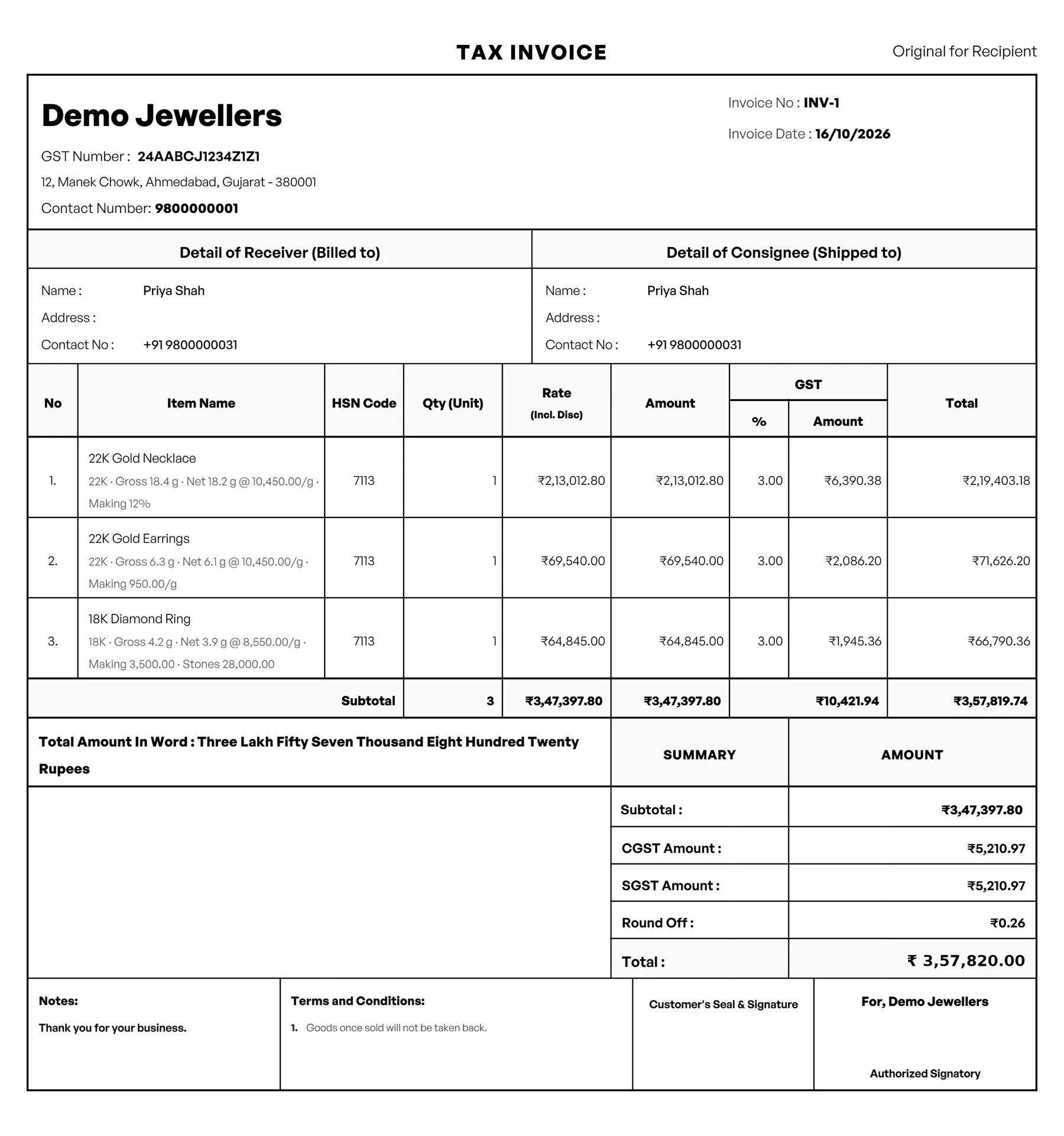
- The working printed under the item on the bill
- A tag for each piece, with its weights and HUID
What is Jewellery Shop Billing Software?
VyapRise is jewellery shop billing software that keeps today's gold and silver rates for each purity, works the line out from the weights, rate, making and stones on the GST invoice, and prints that working under the item so the customer can see how the price was made.
Each piece's tag can carry its gross and net weight and its HUID, the tags show your stock in grams by purity, and each karigar's metal is kept in fine weight. Choose Jewellery shop when you sign up and the weight-and-making line is on. Jewellery by weight and GST invoices work on Free; serial tags for each piece, the karigar metal account, the counter POS, sale orders for made-to-order pieces and purchase bills are part of Pro, free for your first 7 days.
What a jewellery shop needs from billing software
A rate that changes every morning, weights to the decimal, making charges three different ways and a bill the customer can check. These are the parts that matter.
Today's gold and silver rates
In Invoice Settings › Today's gold & silver rates, type the rate per gram for up to five purities, such as 24K, 22K, 18K and 925 silver, each morning. The bill starts from these rates. VyapRise has no live rate feed; you type the day's rate. Free.
Purity on each item
Give each ornament its purity, such as 22K, 18K or 925 silver, under More details on the item, with its HSN and GST rate. A 22K item picks up today's 22K rate on the bill. Free, up to 30 items on the Free plan.
Weight & making on the line
On the sales invoice, a jewellery item's line shows Weight & making under the quantity: purity, gross weight, net weight, the rate per gram (today's rate for that purity, which you can change), the making charge and stones or other charges. Free.
Making charges three ways
Charge making per gram, as a % of the metal value, or as a flat amount, whichever your shop uses for that piece. Add the stones or other charges as an amount. Free.
The working on the printed bill
Press Use and the line becomes one piece at net weight × rate + making + stones. The working prints under the item, for example 22K · Gross 10.5 g · Net 10 g @ 11,000.00/g · Making 12% · Stones 1,500.00. If you later type a different rate by hand, the working is dropped from that line. Free.
GST invoices
Each line takes the item's HSN and GST rate, so the bill splits CGST and SGST or charges IGST, with your logo, bank details and a UPI QR code. Free, 10 invoices a month.
GST billingOne tag for each piece
Give every ornament its own serial number (tag) on the purchase bill and pick it on the sale, so the register shows which pieces are in stock and which are sold. Each tag can carry the piece's gross weight, net weight and HUID (the 6-character hallmark number), edited on the Serial Numbers screen; picking the tag on an invoice line fills the gross and net weight in Weight & making. Serial numbers and purchase bills are part of Pro.
Stock in grams by purity
The Serial Numbers screen shows your stock in grams for each purity: the pieces in stock with their net and gross grams, plus loose metal in grams, such as old gold taken in exchange (items of that purity that are not tagged). Pieces with no weight yet are counted apart. Pro.
Karigar metal account in fine weight
Issue gold, silver or platinum to a karigar (set up as a supplier) and receive ornaments or metal back, each at its touch %, so fine = net × touch %. Allow a wastage % on a receipt and note his making charge. The running fine balance shows per karigar and metal. The metal stays in your stock while he holds it; ornaments received are tagged on Stock IN or a purchase bill, where the making charge is billed. Pro.
Orders, quotations and the counter
Quote a set for a wedding, book a made-to-order piece on a sale order with an advance taken as a payment received, and bill small items such as silver coins at the counter POS. Quotations, sale orders, receipts and the POS are part of Pro.
Sale orders
A day at a jewellery shop using VyapRise
Simple, made-up numbers, real steps, so you can see whether it fits your counter.
9:30 am: the day's rates. Before opening you type today's rates in Invoice Settings: 22K at ₹11,000 a gram, 18K at ₹9,000 and 925 silver at ₹150.
11 am: a gold chain. A customer picks a 22K chain. On the invoice you pick its tag (tags are Pro), and the line's Weight & making fills in gross weight 10.5 g and net weight 10 g from it, with the rate already at ₹11,000. You add making 12% of the metal value and a stone of ₹1,500. You press Use: 10 g × ₹11,000 is ₹1,10,000, making is ₹13,200, the stone ₹1,500, so the line is one piece at ₹1,24,700. With 3% GST of ₹3,741 the bill is ₹1,28,441, and the working prints under the chain.
1 pm: silver anklets. A pair of 925 silver anklets weighs 50 g net. Making is ₹20 a gram, so the line is 50 × ₹150 + ₹1,000: ₹8,500 before GST.
4 pm: an order. A family orders a necklace to be made for a wedding next month. You book it on a sale order with the design in the notes and take a ₹50,000 advance as a payment received. When the necklace is ready you weigh it, bill the order and adjust the advance on the invoice.
6 pm: old gold. A customer buys a ₹60,000 ring and hands in an old 22K bangle. On the same invoice you add a payment of Old gold: net weight 5 g, today's rate ₹11,000 and a 2% deduction for melting loss, so ₹53,900 comes off the bill and she pays the rest in cash. The bangle goes into stock as 5 g of old gold, and the bill prints how it was valued.
- GST on gold, silver and jewellery is generally 3%. Making charges, job work and old gold taken in can be treated differently; confirm the rates and the way you bill them with your CA.
- Item stock is still counted in pieces, or the item's own unit; the grams by purity come from the weights on the tags, and old gold taken in is counted by its net grams. The karigar account is a memo in fine weight: metal with a karigar stays in your stock until the ornaments come back.
- Each piece's HUID, the 6-character hallmark number, is kept on its tag beside its gross and net weight.
Jewellery shop tasks and how VyapRise handles them
Free is free forever; Pro is ₹1,499 per year.
| Task | How VyapRise handles it | Plan |
|---|---|---|
| Today's rates | Rate per gram for up to five purities in Invoice Settings, typed each morning | Free |
| Purity | 22K, 18K, 925 silver and so on, under More details on the item | Free (30 items) |
| Weight & making | Gross and net weight, rate per gram, making per gram / % of metal / flat, stones and other | Free |
| The working on the bill | Printed under the item: purity, gross, net, rate, making, stones | Free |
| GST invoice | HSN and GST on each line, UPI QR, 4 print layouts | Free, 10 a month |
| One tag per piece | Serial number on the purchase bill, picked on the sale; gross and net weight and HUID on each tag; in stock / sold register | Pro |
| Stock in grams | By purity: pieces in stock with net and gross grams, plus loose metal (untagged, such as old gold) | Pro |
| Made-to-order pieces | Sale order with the advance as a payment received, adjusted on the invoice | Pro |
| Quotations | Quotation as a PDF, converts to an order or invoice | Pro |
| Counter billing | POS with cash, UPI and card on one bill | Pro |
| Karigar account | Metal issued and ornaments received at touch % in fine weight, wastage % allowed, making noted; fine balance per karigar and metal | Pro |
| Old gold in exchange | A payment on the bill: purity, gross and net weight, rate per gram, deduction %; its value comes off the bill and its grams go into stock | Free |
There is no live gold-rate feed. Item stock is counted in pieces; the grams view comes from the tags, and fine weight is kept only on the karigar account.
Is VyapRise the right jewellery billing software for you?
Before you set it up, the gaps.
A good fit if you
- Sell gold and silver ornaments priced from the day's rate, the weight and a making charge
- Want the working printed on the bill so customers can check it
- Want a tag for each piece with its weights and HUID, and stock in grams by purity
- Take orders for made-to-order pieces with an advance, see sale orders
- Give regular customers credit, tracked in the customer ledger
Not a fit yet if you
Need item stock counted in grams: VyapRise counts item stock in pieces (the grams by purity come from the weights on the tags; fine weight is kept only for metal with karigars). There is no live gold-rate feed: you type the rate each morning. Weight & making works on the sales invoice line. It runs in the browser and needs internet; there is no offline mode.
Common questions
How does VyapRise work out a jewellery bill?
On the sales invoice, a jewellery item's line has Weight & making: purity, gross weight, net weight, the rate per gram, the making charge (per gram, % of the metal value or flat) and stones or other charges. Press Use and the line becomes one piece at net weight × rate + making + stones, with the working printed under the item. This works on every plan.
Where do I enter today's gold rate?
In Invoice Settings › Today's gold & silver rates, as a rate per gram for up to five purities. Type it each morning; the bill starts each jewellery line at today's rate for the item's purity. There is no live rate feed.
Can I charge making as a percentage?
Yes. Making can be per gram, a % of the metal value or a flat amount, chosen on each line. Stones and other charges are added as an amount.
Can I take old gold in exchange?
Yes. On the sales invoice add a payment of Old gold (exchange) and enter the purity, gross and net weight, the rate per gram (today's rate for the purity is filled in) and the deduction % for melting loss. Its value, net weight × rate less the deduction, comes off what the customer pays, the old gold goes into stock by its net grams, and the bill prints how it was valued. This works on every plan.
What GST rate applies to jewellery?
Generally 3% on gold, silver and jewellery. You set the GST rate on each item. Making charges and job work can be taxed differently, so confirm the rates with your CA.
How much does jewellery billing software cost on VyapRise?
The Free plan is free forever: 10 GST invoices a month, 30 items and 10 customers, with weight and making on the bill, for the owner alone. Serial tags, the karigar metal account, sale orders, quotations, the POS, purchase bills and staff users are part of Pro, at ₹1,499 per year, with no per-user charge. New companies get 7 days of Pro free.
Related pages
- GST billing softwareGST invoices with HSN, UPI QR and print layouts.
- Sales and purchase order softwareQuotations, sale orders and challans.
- Inventory management softwareStock, low-stock alerts and stock reports.
- Customer ledgerCustomer balances, statements and dues.
- POS billing softwareCounter billing with split payments and shifts.
Bill your next piece by weight on VyapRise
Choose Jewellery shop, type today's rates and make your first bill with weight and making. Try Pro free for 7 days; no card needed.